8.7 Physical object actors
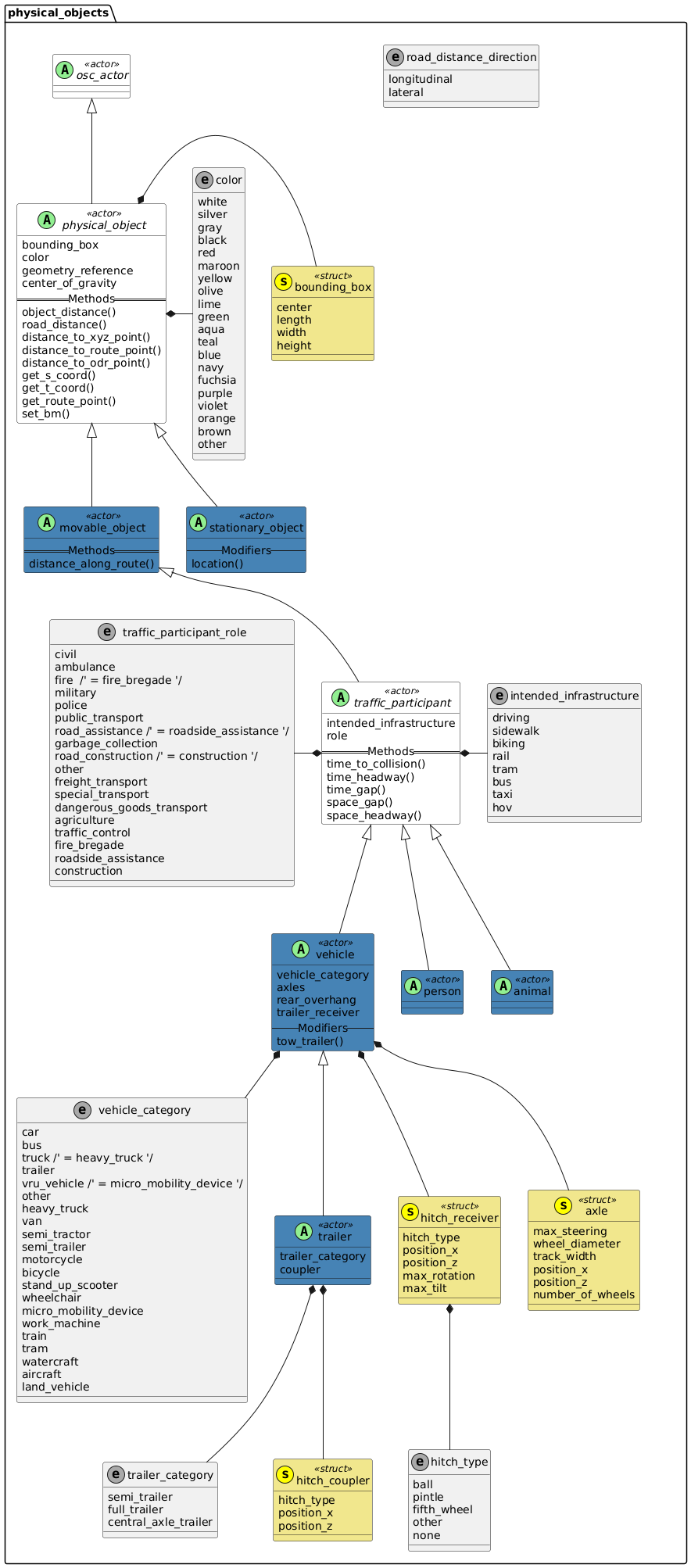
8.7.2 Actor osc_actor
Parent of all actors in the standard library.
|
- Basic information
-
Table 16. Basic information of actor osc_actor Instantiable
no
Children
environment, map, physical_object, traffic_light_controller, traffic_participant_group
8.7.3 Actor physical_object
All tangible objects close to earth, excluding celestial objects such as sun or moon.
- Basic information
-
Table 17. Basic information of actor physical_object Instantiable
no
Parents
Children
- Parameters
-
Table 18. Actor physical_object Parameter Type Mandatory Description yes
See bounding_box
no
See color
geometry_reference
string
no
Opaque reference of an associated 3D geometry model of the physical object. It is implementation-specific how model references are resolved to 3D models.
center_of_gravity
yes
Center of gravity of the object. If unknown, the center of the bounding box may be used instead.
- State variables
-
Table 19. State variables of actor physical_object Variable Type Mandatory Description pose
yes
Position and orientation measured in world coordinates with world system as reference.
8.7.3.1 Methods
8.7.3.1.1 Method object_distance()
Returns the relative distance between the physical_object that calls the method and a reference entity.
The distance is computed as the position of the reference entity, measured in the coordinate system of the physical_object that calls the method.
This calculation is performed either in the longitudinal direction (x-axis), lateral direction (y-axis), vertical direction (z-axis), or as a+ Euclidean distance (length of a straight line).
By default, the distance is measured between the reference points of the respective entities. Optionally, the distance between the bounding boxes can be computed instead.
- Prototype
-
extend physical_object: def object_distance(reference: physical_object, direction: distance_direction, mode: distance_mode = reference_points) -> length - Return value
-
The relative distance between the
physical_objectthat calls the method and the reference entity. - Parameters
-
Table 20. Parameters for method object_distance() Parameter Type Description reference
The reference entity.
direction
-
Use
longitudinalto measure the distance in the x-coordinate. -
Use
lateralto measure the distance in the y-coordinate. -
Use
verticalto measure the distance in the z-coordinate. -
Use
euclideanto measure the Euclidean distance (length of a straight line).
mode
-
Use
reference_pointsto measure the distance between the reference points. (Default) -
Use
bounding_boxesto measure the distance between the bounding boxes.
-
8.7.3.1.2 Method road_distance()
Returns the relative road distance between the physical_object that calls the method and a reference entity.
The distance is computed as the difference between the s-t-coordinates of the reference entity and the s-t-coordinates of the physical_object that calls the method.
This calculation is performed either in the longitudinal direction (s-axis) or the lateral direction (t-axis).
By default, the distance is measured between the reference points of the respective entities. Optionally, the distance between the bounding boxes can be computed.
- Prototype
-
extend physical_object: def road_distance(reference: physical_object, direction: road_distance_direction, mode: distance_mode = reference_points, route_type: on_route_type = on_road) -> length - Return value
-
The relative distance between the
physical_objectthat calls the method and the reference entity. - Parameters
-
Table 21. Parameters for method road_distance() Parameter Type Description reference
The reference entity.
direction
-
Use
longitudinalto measure the distance in the s-coordinate. -
Use
lateralto measure the distance in the t-coordinate.
mode
-
Use
reference_pointsto measure the distance between the reference points. (Default) -
Use
bounding_boxesto measure the distance between the bounding boxes.
route_type
Select the type of route that will be used to compute the s-coordinate. (Default is
on_road.) -
8.7.3.1.3 Method distance_to_xyz_point()
Returns the relative distance between the physical_object that calls the method and an xyz_point.
The distance is computed as the position of the xyz_point, measured in the coordinate system of the physical_object that calls the method.
This calculation is performed either in the longitudinal direction (x-axis), lateral direction (y-axis), vertical direction (z-axis), or as a Euclidean distance (length of a straight line).
By default, the distance is measured from the reference point of the physical_object.
Optionally, the distance from the bounding box can be computed.
- Prototype
-
extend physical_object: def distance_to_xyz_point(point: xyz_point, direction: distance_direction, mode: distance_mode = reference_points) -> length - Return value
-
The relative distance between the
physical_objectthat calls the method and the reference point. - Parameters
-
Table 22. Parameters for method distance_to_xyz_point() Parameter Type Description point
The reference point.
direction
-
Use
longitudinalto measure the distance in the x-coordinate. -
Use
lateralto measure the distance in the y-coordinate. -
Use
verticalto measure the distance in the z-coordinate. -
Use
euclideanto measure the Euclidean distance (length of a straight line).
mode
-
Use
reference_pointsto measure the distance from the reference point of the actor. (Default) -
Use
bounding_boxesto measure the distance from the bounding box of the actor.
-
8.7.3.1.4 Method distance_to_route_point()
Returns the relative distance between the physical_object that calls the method and a route_point.
The distance is computed as the difference between the s-t-coordinates of the route_point and the s-t-coordinates of the physical_object that calls the method.
This calculation is performed either in the longitudinal direction (s-axis) or the lateral direction (t-axis).
By default, the distance is measured from the reference point of the physical_object.
Optionally, the distance from the bounding box can be computed.
- Prototype
-
extend physical_object: def distance_to_route_point(point: route_point, direction: road_distance_direction, mode: distance_mode = reference_points, route_type: on_route_type = on_road) -> length - Return value
-
The relative distance between the
physical_objectthat calls the method and the reference point. - Parameters
-
Table 23. Parameters for method distance_to_route_point() Parameter Type Description point
The reference point.
direction
-
Use
longitudinalto measure the distance in the s-coordinate. -
Use
lateralto measure the distance in the t-coordinate.
mode
-
Use
reference_pointsto measure the distance from the reference point of the actor. (Default) -
Use
bounding_boxesto measure the distance from the bounding box of the actor.
route_type
Select the type of route that will be used to compute the s-coordinate. (Default is
on_road.) -
8.7.3.1.5 Method distance_to_odr_point()
Returns the relative distance between the physical_object that calls the method and an odr_point.
The distance is computed as the difference between the s-t-coordinates of the odr_point and the s-t-coordinates of the physical_object that calls the method.
This calculation is performed either in the longitudinal direction (s-axis) or the lateral direction (t-axis).
By default, the distance is measured from the reference point of the physical_object.
Optionally, the distance from the bounding box can be computed.
- Prototype
-
extend physical_object: def distance_to_odr_point(point: odr_point, direction: road_distance_direction, mode: distance_mode = reference_points, route_type: on_route_type = on_road) -> length - Return value
-
The relative distance between the
physical_objectthat calls the method and the reference point. - Parameters
-
Table 24. Parameters for method distance_to_odr_point() Parameter Type Description point
The reference point.
direction
-
Use
longitudinalto measure the distance in the s-coordinate. -
Use
lateralto measure the distance in the t-coordinate.
mode
-
Use
reference_pointsto measure the distance from the reference point of the actor. (Default) -
Use
bounding_boxesto measure the distance from the bounding box of the actor.
route_type
Select the type of route that will be used to compute the s-coordinate. (Default is
on_road.) -
8.7.3.1.6 Method get_s_coord()
Returns the s-coordinate of the physical_object.
By default, the method uses the s-axis of the road where the physical_object is located, but the user can select other route element types.
If the physical_object is not on a route the method returns an error.
- Prototype
-
extend physical_object: def get_s_coord(route_type: on_route_type = on_road) -> length - Return value
-
Returns a length with the s-coordinate.
- Parameters
-
Table 25. Parameters for method get_s_coord() Parameter Type Description route_type
Select the type of route that will be used to compute the s-coordinate:
-
on_road(default)
Use the s-axis of theroadwhere the actor is located. If the actor is not on a road the method returns an error. -
on_lane_section
Use the s-axis of thelane_sectionwhere the actor is located. If the actor is not on a lane section the method returns an error. -
on_lane
Use the s-axis of thelanewhere the actor is located. If the actor is not on a lane the method returns an error. -
on_crossing
Use the s-axis of thecrossingwhere the actor is located. If the actor is not on a crossing the method returns an error.
-
8.7.3.1.7 Method get_t_coord()
Returns the t-coordinate of the physical_object.
By default, the method uses the t-axis of the road where the physical_object is located, but the user can select other route element types.
If the physical_object is not on a route the method returns an error.
- Prototype
-
extend physical_object: def get_t_coord(route_type: on_route_type = on_road) -> length - Return value
-
Returns a length with the t-coordinate.
- Parameters
-
Table 26. Parameters for method get_t_coord() Parameter Type Description route_type
Select the type of route that will be used to compute the t-coordinate:
-
on_road(default)
Use the t-axis of theroadwhere the actor is located. If the actor is not on a road the method returns an error. -
on_lane_section
Use the t-axis of thelane_sectionwhere the actor is located. If the actor is not on a lane section the method returns an error. -
on_lane
Use the t-axis of thelanewhere the actor is located. If the actor is not on a lane the method returns an error. -
on_crossing
Use the t-axis of thecrossingwhere the actor is located. If the actor is not on a crossing the method returns an error.
-
8.7.3.1.8 Method get_route_point()
Returns the route_point where the physical_object is located.
By default, the method uses the road where the physical_object is located, but the user can select other route element types.
If the physical_object is not on a route the method returns an error.
- Prototype
-
extend physical_object: def get_route_point(route_type: on_route_type = on_road) -> route_point - Return value
-
Returns a
route_point. - Parameters
-
Table 27. Parameters for method get_route_point() Parameter Type Description route_type
Select the type of route that will be used to compute the route_point:
-
on_road(default)
Use the t-axis of theroadwhere the actor is located. If the actor is not on a road the method returns an error. -
on_lane_section
Use the t-axis of thelane_sectionwhere the actor is located. If the actor is not on a lane section the method returns an error. -
on_lane
Use the t-axis of thelanewhere the actor is located. If the actor is not on a lane the method returns an error. -
on_crossing
Use the t-axis of thecrossingwhere the actor is located. If the actor is not on a crossing the method returns an error.
-
8.7.3.2 Examples
# Constrain vehicle to be a wide car
my_wide_car: vehicle
keep(my_wide_car.vehicle_category == car)
keep(my_wide_car.bounding_box.width >= 1.95m)
keep(my_wide_car.color == maroon)
keep(my_wide_car.axles.size() == 2)
keep(my_wide_car.axles[0].number_of_wheels == 2)
keep(my_wide_car.axles[1].number_of_wheels == 2)
keep(my_wide_car.intended_infrastructure[0] == driving)

# Constrain vehicle to be a motorcycle
my_motorcycle: vehicle
keep(my_motorcycle.vehicle_category == vru_vehicle)
keep(my_motorcycle.axles.size() == 2)
keep(my_motorcycle.axles[0].number_of_wheels == 1)
keep(my_motorcycle.axles[1].number_of_wheels == 1)
keep(my_motorcycle.intended_infrastructure[0] == driving)

# Constrain vehicle to be a bicycle
my_bicycle: vehicle
keep(my_bicycle.vehicle_category == vru_vehicle)
keep(my_bicycle.axles.size() == 2)
keep(my_bicycle.axles[0].number_of_wheels == 1)
keep(my_bicycle.axles[1].number_of_wheels == 1)
keep(my_bicycle.intended_infrastructure[0] == biking)
8.7.4 Actor stationary_object
A stationary_object is a physical_object that is anchored and whose bounding box cannot change its position or speed like a tree or a building.
- Basic information
-
Table 29. Basic information of actor stationary_object Instantiable
yes
Parents
- Inherited parameters and variables
-
Table 30. Inherited parameters and variables of actor stationary_object Parent Inherited parameters and variables pose, bounding_box, color, geometry_reference, center_of_gravity
8.7.4.1 Modifiers
8.7.4.1.1 Modifier location()
Specifies the location of a stationary_object.
Shall be invoked before the do section, as the location cannot be time-dependent.
- Parameters
-
Table 31. Parameters for modifier stationary_object.location() Parameter Type Description pose
Location of the stationary object for the whole scenario.
- Syntax
-
Code 46. Syntax examples for stationary_object.location()
my_pose: pose_3d
# Add constraints for fields of my_pose
my_building: stationary_object
my_building.location(my_pose)

do: ...
8.7.5 Actor movable_object
A movable_object is a physical_object that is not anchored and can, therefore, be moved and change its position and speed like a rock or a ball.
- Basic information
-
Table 32. Basic information of actor movable_object Instantiable
yes
Parents
Children
- State variables
-
Table 33. State variables of actor movable_object Variable Type Mandatory Description velocity
yes
Translational and rotational velocity measured in object coordinates with world system as reference.
acceleration
yes
Translational and rotational acceleration measured in object coordinates with world system as reference.
speed
yes
Speed in center_of_gravity defined as sqrt(velocity.translational.x² + velocity.translational.y²) * sign(velocity.translational.x)
- Inherited parameters and variables
-
Table 34. Inherited parameters and variables of actor movable_object Parent Inherited parameters and variables pose, bounding_box, color, geometry_reference, center_of_gravity
8.7.5.1 Methods
8.7.5.1.1 Method distance_along_route()
Returns the distance between an actor and the start or end of a route, measured along the s-axis of the route. User can pass either a route_element or a compound_route.
- Prototype
-
extend traffic_participant: def distance_along_route(route: route, from: route_distance_enum = from_start) -> length - Return value
-
Returns a length measured along the s-axis of the route.
- Parameters
-
Table 35. Parameters for method distance_along_route() Parameter Type Description route
The route along which the distance should be measured.
If the actor calling the method is not on the given route the method returns an error.from
Reference point from which the distance is measured.
-
from_start(default)
Method returns the relative s-coordinate from route.start_point() to the actor.
Positive means that the traffic participant is ahead of the start point. -
from_end
Method returns the relative s-coordinate from the actor to the route.end_point().
Positive means that the traffic participant is behind of the end point.
-
8.7.6 Actor traffic_participant
A traffic_participant is a physical_object that is relevant within traffic and may perform traffic-related actions (see traffic_participant actions) such as following a route. A traffic_participant includes both, objects that do participate in traffic actively like a driven vehicle and objects that do not move throughout the scenario like a parked vehicle.
- Basic information
-
Table 36. Basic information of actor traffic_participant Instantiable
no
Parents
Children
- Parameters
-
Table 37. Actor traffic_participant Parameter Type Mandatory Description list of intended_infrastructure
yes
See intended_infrastructure for definition. Intended usage is for further specification of an entity. For example, together with vehicle_category or to provide hints for implemenations where to spawn and / or auto-route entities. Note that multiple types of infrastructure can be assigned because of the list character of this type.
role
no
See traffic_participant_role enum. Role for the traffic participant.
- Inherited parameters and variables
-
Table 38. Inherited parameters and variables of actor traffic_participant Parent Inherited parameters and variables pose, bounding_box, color, geometry_reference, center_of_gravity
8.7.6.1 Methods
8.7.6.1.1 Method time_to_collision()
Returns the time that is left until a possible collision between a traffic_participant and a reference physical_object takes place.
- Prototype
-
extend traffic_participant: def time_to_collision(reference: physical_object) -> time - Return value
-
Returns the time until the bounding_box of traffic_participant would collide with the bounding box of the reference physical_object, assuming both keep moving with their current velocity.
- Parameters
-
Table 39. Parameter for method time_to_collision() Parameter Type Description reference
The reference physical_object.
- Syntax
-
Code 47. Syntax example for method time_to_collision()
scenario prevent_collision:
    ego: vehicle
    other_car: vehicle

    var collision_time: time = sample(ego.time_to_collision(reference: other_car), every(2s))

    do parallel:
        other_car.drive() with:
            speed(50kph)

        ego.drive() with:
            position(behind: other_car)
            until rise(collision_time < 10s)
8.7.6.1.2 Method time_headway()
Measure the time headway between the traffic_participant that calls the method and a reference physical_object.
Time headway is defined as the time it will take the trailing actor to reach the current position of the leading actor.
The traffic_participant and the reference physical_object are assumed to be moving in a common direction.
-
The distance between the objects is measured from the front of the leading object to the front of the trailing object.
-
For example, for two vehicles heading in the same direction, from front bumper to front bumper.
-
-
A positive value means that the
traffic_participantis trailing behind the referencephysical_object. -
A negative value means that the
traffic_participantis leading ahead of the referencephysical_object. -
This distance is divided by the speed of the trailing object.
The result of this division is the time headway.
- Prototype
-
extend vehicle: def time_headway(reference: physical_object) -> time - Return value
-
Returns the time headway according to the above definition.
- Parameters
-
Table 40. Parameter for method time_headway() Parameter Type Description reference
The reference physical_object.
8.7.6.1.3 Method time_gap()
Returns the time distance between a traffic_participant and a reference physical_object.
For example, assume two vehicles (a traffic participant and a reference physical object) moving along a road in a common direction.
If direction is set to longitudinal, calculate the return value in the following way:
-
Measure the distance from the rear bumper of the leading vehicle to the front bumper of the trailing vehicle.
-
Divide this distance by the speed of the trailing vehicle.
-
The result is the longitudinal time gap.
For two vehicles traveling in the same lane the lateral time gap is not defined.
Now consider the two vehicles traveling in the same way but in different lanes.
If direction is set to lateral, calculate the return value in the following way:
-
Measure the distance from the right side of the vehicle on the left to the left side of the vehicle on the right.
-
Divide by the lateral velocity of the
traffic_participantin the direction of the referencephysical_object. -
The result is the lateral time gap.
If the bounding boxes of traffic_participant and the reference physical_object are overlapping in the desired direction, the method shall return zero.
For two vehicles traveling in different lanes the longitudinal time gap is not defined.
- Prototype
-
extend traffic_participant: def time_gap(reference: physical_object, direction: road_distance_direction) -> time - Return value
-
Returns the time gap according to the definition above.
- Parameters
-
Table 41. Parameters for method time_gap() Parameter Type Description reference
The reference entity.
direction
-
longitudinal
The relative s-coordinate.
Positive means that the traffic participant is ahead of the reference. -
lateral
The relative t-coordinate.
Positive means that the traffic participant is left of the reference.
-
8.7.6.1.4 Method space_gap()
Returns the space distance between a traffic_participant and a reference physical_object.
The space gap distance is defined as the distance one object would need to travel to touch another object, in a given direction.
For example, assume two vehicles (a traffic participant and a reference physical object) moving along a road in a common direction.
If direction is set to longitudinal, then the space gap should be measured as the distance from the rear bumper of the leading vehicle to the front bumper of the trailing vehicle.
For two vehicles traveling in the same lane the space time gap is not defined.
Now consider the two vehicles traveling in the same way but in different lanes.
If direction is set to lateral, then the space gap should be measured as the distance from the right side of the vehicle on the left to the left side of the vehicle on the right.
For two vehicles traveling in different lanes the longitudinal space gap is not defined.
If the bounding boxes of the two vehicles are overlapping in the desired direction, the method shall return zero.
- Prototype
-
extend traffic_participant: def space_gap(reference: physical_object, direction: road_distance_direction) -> length - Return value
-
Returns the space gap distance according to the definition above.
- Parameters
-
Table 42. Parameters for method space_gap() Parameter Type Description reference
The reference entity.
direction
-
longitudinal
The relative s-coordinate.
Positive means that the traffic participant is ahead of the reference. -
lateral
The relative t-coordinate.
Positive means that the traffic participant is left of the reference.
-
8.7.6.1.5 Method space_headway()
Measure the space headway between the traffic_participant that calls the method and a reference physical_object.
Space headway is defined as the distance that the trailing actor needs to travel to reach the current position of the leading actor.
The traffic_participant and the reference physical_object are assumed to be moving in a common direction.
-
The space headway is measured as the distance from the front of the leading object to the front of the trailing object.
-
For example, for two vehicles heading in the same direction, from front bumper to front bumper.
-
-
A positive value means that the
traffic_participantis trailing behind the referencephysical_object. -
A negative value means that the
traffic_participantis leading ahead of the referencephysical_object.
This distance is the space headway.
- Prototype
-
extend vehicle: def space_headway(reference: physical_object) -> length - Return value
-
Returns the space headway according to the description above.
- Parameters
-
Table 43. Parameter for method space_headway() Parameter Type Description reference
The reference physical_object.
8.7.7 Actor vehicle
A device intended for transport of people or cargo. Here restricted to land vehicles, meaning vehicles that move on a land surface such as a road or sidewalk.
- Basic information
-
Table 44. Basic information of actor vehicle Instantiable
yes
Parents
Children
- Parameters
-
Table 45. Actor vehicle Parameter Type Mandatory Description yes
See vehicle_category
axles
list of axle
yes
See axle
rear_overhang
yes
Rear overhang of the vehicle or more explicitly the horizontal distance between the end of the bounding_box and the center of the rear axle.
trailer_receiver
no
Receiver part of the hitch that acts as mounting point for connecting a trailer. If not specified, the vehicle does not have a receiver hitching device for trailers.
- Inherited parameters and variables
-
Table 46. Inherited parameters and variables of actor vehicle Parent Inherited parameters and variables pose, bounding_box, color, geometry_reference, center_of_gravity
8.7.7.1 Modifiers
8.7.7.1.1 Modifier tow_trailer()
Specifies that the vehicle is towing a trailer. This means that the trailer receiver of the vehicle must be connected to the coupler of the trailer. Relevant state variables shall be updated to specify the connection between tow vehicle and trailer.
- Parameters
-
Table 47. Parameters for modifier vehicle.tow_trailer() Parameter Type Description trailer
trailer
Trailer to be towed.
- Syntax
-
Code 48. Syntax examples for vehicle.tow_trailer()
my_car: vehicle
my_trailer: trailer

my_car.tow_trailer(my_trailer)

do: ...
8.7.8 Actor trailer
A trailer is any non-self-propelled vehicle that is constructed to be towed by a power-driven vehicle. This also includes semi–trailers. (According to ECE/TRANS/WP.29/78/Rev.4)
- Basic information
-
Table 48. Basic information of actor trailer Instantiable
yes
Parents
- Parameters
-
Table 49. Actor trailer Parameter Type Mandatory Description yes
Specify trailer category.
coupler
yes
Coupler part of the hitch that acts as mounting point to connect this trailer to the tow vehicle.
- State variables
-
Table 50. State variables of actor trailer Variable Type Mandatory Description tow_vehicle
yes
Reference to the vehicle that is towing this trailer. The tow vehicle can also be another trailer. If not specified, the trailer is not towable.
- Inherited parameters and variables
-
Table 51. Inherited parameters and variables of actor trailer Parent Inherited parameters and variables pose, bounding_box, color, geometry_reference, center_of_gravity
8.7.8.1 Examples
my_towing_truck: vehicle
keep(my_towing_truck.vehicle_category == truck)

my_receiver: hitch_receiver
keep(my_receiver.trailer_category == fifth_wheel)
keep(my_receiver.position_x == -1.2)
keep(my_receiver.position_z == 0.5)

# Specify hitch receiver characteristics on tow vehicle:
keep(my_towing_truck.trailer_receiver == my_receiver)

my_trailer: trailer
keep(my_trailer.trailer_category == full_trailer)

my_coupler: coupler_hitch
keep(my_coupler.position_x == 2.5)
keep(my_coupler.position_z == 0.5)

# Specify hitch coupler characteristics on trailer:
keep(my_trailer.coupler == my_coupler)

# The truck is towing a trailer:
my_towing_truck.tow_trailer(my_trailer)
Add the following lines to attach a second trailer to the combination in Code 46, "Example 1: A vehicle with a trailer attached":
my_trailer_also_has_a_receiver: hitch_receiver
keep(my_trailer_also_has_a_receiver.trailer_category == ball)
keep(my_trailer_also_has_a_receiver.position_x == -1.6)
keep(my_trailer_also_has_a_receiver.position_z == 0.5)

# Specify the hitch receiver on the first trailer:
keep(my_trailer.trailer_receiver == my_trailer_also_has_a_receiver)

my_second_trailer: trailer
keep(my_second_trailer.trailer_category == full_trailer)

second_trailer_coupler: hitch_coupler
keep(second_trailer_coupler.position_x == 2.5)
keep(second_trailer_coupler.position_z == 0.5)

# Specify the hitch coupler on the second trailer
keep(my_second_trailer.coupler == second_trailer_coupler)

# The second trailer is towed by the first trailer
my_trailer.tow_trailer(my_second_trailer)
When viewed driving to the left, the combination is now <my_towing_truck|--<my_trailer|--<my_second_trailer|
8.7.9 Actor person
A person represents a human being. A person may act in different and changing modalitites throughout a scenario. For example, walking or being in a car.
- Basic information
-
Table 52. Basic information of actor person Instantiable
yes
Parents
- Inherited parameters and variables
-
Table 53. Inherited parameters and variables of actor person Parent Inherited parameters and variables pose, bounding_box, color, geometry_reference, center_of_gravity
8.7.10 Actor animal
An animal represents a living being which is not a human. An animal may act in different and changing modalitites throughout a scenario. For example, running or being in a car.
- Basic information
-
Table 54. Basic information of actor animal Instantiable
yes
Parents
- Inherited parameters and variables
-
Table 55. Inherited parameters and variables of actor animal Parent Inherited parameters and variables pose, bounding_box, color, geometry_reference, center_of_gravity
8.7.11 Struct bounding_box
Simplified three dimensional shape enclosing the physical_object. The bounding box does NOT include side mirrors for vehicles. The height includes the ground_clearance, therefore it always goes from the top to the ground.
- Basic information
-
Table 56. Basic information of struct bounding_box Instantiable
no
- Parameters
-
Table 57. Struct bounding_box Parameter Type Mandatory Description center
yes
Represents the geometrical center of the bounding box expressed in coordinates that refer to the coordinate system of the physical_object
length
yes
Dimension in x-direction of the coordinate system of the physical_object
width
yes
Dimension in y-direction of the coordinate system of the physical_object
height
yes
Dimension in z-direction of the coordinate system of the physical_object
8.7.12 Struct axle
Taken from ASAM OpenSCENARIO 1.x plus number of wheels to avoid ambiguities (for example, twin tires). Check definitions there for now.
- Basic information
-
Table 58. Basic information of struct axle Instantiable
no
Used by
- Parameters
-
Table 59. Struct axle Parameter Type Mandatory Description max_steering
yes
Maximum steering angle for the wheels on the axle
wheel_diameter
yes
Diameter for the wheels on this axle
track_width
yes
Distance between the centerline of the outer wheels on opposing sides of the axle
position_x
yes
Longitudinal position of the axle in the x-axis of the vehicle. For a 2-axle vehicle, the rear axle must have position_x = 0m
position_z
yes
number_of_wheels
uint
yes
Number of wheels on the axle
8.7.13 Struct hitch_receiver
A hitch is a device that connects a trailer to a towing vehicle. The hitch_receiver is on the tow vehicle. For a successful connection between tow vehicle and trailer, the hitch_type between receiver and coupler must match.
- Basic information
-
Table 60. Basic information of struct hitch_receiver Instantiable
no
Used by
- Parameters
-
Table 61. Struct hitch_receiver Parameter Type Mandatory Description yes
Type of hitch connector. Default: none, for vehicles that do not have a hitch receiver.
position_x
yes
Position of the
hitch_receiveron the x-axis of the tow vehicle.position_z
yes
Position of the
hitch_receiveron the z-axis of the tow vehicle.max_rotation
no
Maximum relative rotation between the tow vehicle and the trailer.
max_tilt
no
Maximum relative tilt (pitch, roll) between the towing vehicle and the trailer.
- State variables
-
Table 62. State variables of struct hitch_receiver Variable Type Mandatory Description is_towing
bool
yes
Indicates if tow vehicle and trailer are connected (true) or disconnected (false).
8.7.14 Struct hitch_coupler
A hitch is a device that connects a trailer to a towing vehicle. The hitch_coupler is on the trailer. For a successful connection between tow vehicle and trailer, the hitch_type between receiver and coupler must match.
- Basic information
-
Table 63. Basic information of struct hitch_coupler Instantiable
no
Used by
- Parameters
-
Table 64. Struct hitch_coupler Parameter Type Mandatory Description yes
Type of hitch connector. There is no default type for the hitch coupler.
position_x
yes
Position of the
hitch_coupleron the x-axis of the trailer.position_z
yes
Position of the
hitch_coupleron the z-axis of the trailer. - State variables
-
Table 65. State variables of struct hitch_coupler Variable Type Mandatory Description is_towed
bool
yes
Indicates if tow vehicle and trailer are connected (true) or disconnected (false).
8.7.15 Enum color
Description of the color of a physical_object. Specifies the color of a physical object. Not intended to replace more detailed material properties, but rather for debugging purposes. For a vehicle this should affect the vehicle body, for pedestrians it may affect the main piece of clothing. Based on the set defined by W3C for HTML_ "basic colors".
- Basic information
-
Table 66. Basic information of enum color Instantiable
no
- Values
-
Table 67. Enum color Value Comment white
RGB(255,255,255)
silver
RGB(192,192,192)
gray
RGB(128,128,128)
black
RGB(0,0,0)
red
RGB(255,0,0)
maroon
RGB(128,0,0)
yellow
RGB(255,255,0)
olive
RGB(128,128,0)
lime
RGB(0,255,0)
green
RGB(0,128,0)
aqua
RGB(0,255,255)
teal
RGB(0,128,128)
blue
RGB(0,0,255)
navy
RGB(0,0,128)
fuchsia
RGB(255,0,255)
purple
RGB(128,0,128)
violet
RGB(238,130,238)
orange
RGB(255,165,0)
brown
RGB(165,42,42)
other
Other (unspecified but known) color
8.7.16 Enum vehicle_category
Vehicle category based on UN ECE/TRANS/WP.29/78/Rev.6 extended by non-self-propelled vehicles.
- Basic information
-
Table 68. Basic information of enum vehicle_category Instantiable
no
Used by
- Values
-
Table 69. Enum vehicle_category Value Comment car
A car is a motorized vehicle designed primarily for passenger transportation. A car typically has four wheels. (UNECE category M1, G and L7)
bus
A bus is a motorized vehicle designed to carry multiple passengers. (UNECE category M3 classes I, II, III)
truck = heavy_truck
This category is provided for backwards compatibility and should not be used. Use heavy_truck instead. The value is equal to heavy_truck.
A trailer is a non-motorized vehicle designed for being towed by a motorized vehicle to carry goods, animals, or people. (UNECE category O1 to O3)
vru_vehicle = micro_mobility_device
This category is provided for backwards compatibility and should not be used. Use micro_mobility_device or one of the more specific VRU categories (bicycle, stand_up_scooter, wheelchair) instead. This value is equal to micro_mobility_device.
other
Unspecified but known type of vehicle
heavy_truck
A heavy truck is a large commercial vehicle designed for transporting heavy loads. The cargo area is rigidly fixed to the vehicle itself. (UNECE category N2)
van
A van is a motorized vehicle with a larger cargo area than a car, used for transporting goods or people. This category is not intended for mini vans, which shall rather be categorized as cars. (UNECE categories M2 and N1.)
semi_tractor
A semi-tractor is a vehicle designed for towing semi-trailers for the transportation of heavy loads. (UNECE category N3)
semi_trailer
A semi-trailer is a vehicle designed for being towed by a semi-tractor. Characteristics compared to a regular trailer are the large size, the fact that a large portion of the weight is supported at the hitch, and a large overlap with the towing vehicle, i.e. the semi-tractor. (UNECE category O4).
motorcycle
A motorcycle is a motorized vehicle designed primarily for passenger transportation. Compared to a car, fewer passive safety features, such as a full passenger cell, are typically present. This category includes both two-wheeled motorcycles and three-wheeled vehicles like motorcycles with side-cars or trikes. (UNECE categories L1 to L5)
bicycle
A bicycle is a human-powered or motor-assisted, pedal-driven vehicle. This category includes typical two-wheeled bicycles as well as cargo-bikes and other pedal-driven vehicles with more than two wheels.
stand_up_scooter
A stand-up scooter is a compact, typically two-wheeled device. It is operated with the rider standing on a deck between the wheels. It may be propelled by a motor or the rider making a kicking movement.
wheelchair
A wheelchair is a manually or electrically powered mobility device with a seat mounted on a wheeled frame. Manual propulsion may be provided by the seated person or a person pushing the wheelchair.
micro_mobility_device
A micro-mobility device is a small, lightweight vehicle for short-distance travel, like hoverboards or roller skates. While bicycles, stand-up scooters, and wheelchairs may technically fall into this category, the respective detailed categories shall be used instead.
work_machine
A work-machine is a vehicle designed for specific tasks (e.g., construction equipment, agricultural tractors, forklifts).
train
A train is a vehicle designed for the transport of passengers and freight on rail infrastructure. The rail infrastructure for trains is mostly grade-separated from the public road infrastructure as trains have exclusive right-of-way. Therefore, in case crossings with the road infrastructure occur, the exclusive right-of-way is ensured, e.g. by railway barriers. A train often acts as a series of connected vehicles.
tram
A tram is a vehicle designed for using rail infrastructure for the transport of passengers on rail infrastructure. The rail infrastructure may fully or partially overlap with public road infrastructure. In contrast to trains, trams do not have exclusive right-of-way. A tram often acts as a series of connected vehicles.
watercraft
A watercraft is a vehicle designed for travel on water (boats, ships, etc.). This category is deliberately generic and may be refined in future versions as needed.
aircraft
An aircraft is a vehicle designed for flight through the air (airplanes, helicopters, etc.). This category is deliberately generic and may be refined in future versions as needed.
land_vehicle
A land vehicle is a vehicle designed for travel on land. This category is intentionally unspecific to include land vehicles that do not fall into ther categories and may be detailed out in future versions if use-cases require so.
8.7.17 Enum trailer_category
Trailer categories according to ECE/TRANS/WP.29/78/Rev.4
- Basic information
-
Table 70. Basic information of enum trailer_category Instantiable
no
Used by
- Values
-
Table 71. Enum trailer_category Value Comment semi_trailer
A towed vehicle in which the axle(s) is (are) positioned behind the centre of gravity of the vehicle (when uniformly loaded), and which is equipped with a connecting device permitting horizontal and vertical forces to be transmitted to the towing vehicle. One or more of the axles may be driven by the towing vehicle.
full_trailer
A towed vehicle that has at least two axles and is equipped with a towing device that can move vertically (in relation to the trailer) and controls the direction of the front axle(s), but that transmits no significant static load to the towing vehicle. One or more of the axles may be driven by the towing vehicle.
central_axle_trailer
A towed vehicle, equipped with a towing device that cannot move vertically (in relation to the trailer) and in which the axle(s) is (are) positioned close to the centre of gravity of the vehicle (when uniformly loaded) such that only a small static vertical load - not exceeding 10 percent of that corresponding to the maximum mass of the trailer or a load of 1,000 daN (whichever is the lesser) - is transmitted to the towing vehicle. One or more of the axles may be driven by the towing vehicle.
8.7.18 Enum hitch_type
Types of trailer hitches
- Basic information
-
Table 72. Basic information of enum hitch_type Instantiable
no
Used by
- Values
-
Table 73. Enum hitch_type Value Comment ball
Standard ball and coupler (including gooseneck) connector.
pintle
Pintle and hook connector.
fifth_wheel
Fifth wheel connector with jaws and kingpin.
other
Other type.
none
There is no hitch connector. Default value for all vehicles.
8.7.19 Enum intended_infrastructure
Infrastructure that is typically used by a traffic participant. Can be used to further specify an entity. For example, together with vehicle_category or to provide hints for simulators where to spawn entities. Each entity can be assigned multiple values. Note that this needs to be aligned with road abstraction feature.
- Basic information
-
Table 74. Basic information of enum intended_infrastructure Instantiable
no
- Values
-
Table 75. Enum intended_infrastructure Value Comment driving
Taken from ASAM OpenDRIVE: "Normal" drivable road that is not one of the other types
sidewalk
Taken from ASAM OpenDRIVE: Lane reserved for pedestrians
biking
Taken from ASAM OpenDRIVE: Lane reserved for cyclists
rail
Taken from ASAM OpenDRIVE: Lane reserved for trains
tram
Taken from ASAM OpenDRIVE: Lane reserved for trams
bus
Taken from ASAM OpenDRIVE: Lane reserved for buses
taxi
Taken from ASAM OpenDRIVE: Lane reserved for taxis
hov
Taken from ASAM OpenDRIVE: Lane reserved for High Occupancy Vehicles (HOVs)
8.7.20 Enum traffic_participant_role
The role specifies the perceivable role of a traffic participant, as that might influence the behavior in traffic of surrounding traffic participants. The majority of traffic participants are civil, representing normal traffic participants. Whether a role is active (for example, in the sense of an ambulance flashing its emergency vehicle lighting) is independent of the role of the traffic participant.
- Basic information
-
Table 76. Basic information of enum traffic_participant_role Instantiable
no
- Values
-
Table 77. Enum traffic_participant_role Value Comment civil
Traffic participant that can be perceived as regular civilian and does not perceivably indicate any other role.
ambulance
Traffic participant that can be perceived as belonging to a medical emergency service.
fire = fire_bregade
This role is provided for backwards compatibility and should not be used. Use fire_bregade instead. The value is equal to fire_bregade.
military
Traffic participant that can be perceived as belonging to a military force.
police
Traffic participant that can be perceived as belonging to a law enforcement agency.
public_transport
Traffic participant that can be perceived as a form of mass passenger transportation mode (e.g. public transport bus, rental passenger bus, tram) or clearly recognizable passenger transportation mode (e.g. taxi).
road_assistance = roadside_assistance
This role is provided for backwards compatibility and should not be used. Use roadside_assistance instead. The value is equal to roadside_assistance.
garbage_collection
Traffic participant that can be perceived as belonging to a garbage collection service.
road_construction = construction
This role is provided for backwards compatibility and should not be used. Use construction instead. The value is equal to construction.
other
The entity has another unspecified but known role.
freight_transport
Traffic participant that can be perceived as freight transport, e.g. freight truck, delivery van, delivery bike, postman.
special_transport
Traffic participant that can be perceived as part of special transport (e.g. heavy or oversized load).
dangerous_goods_transport
Traffic participant that can be perceived as part of dangerous goods/hazardous materials transport.
agriculture
Traffic participant that can be perceived as agricultural machinery.
traffic_control
Traffic participant that can be perceived as an obligated traffic control unit (e.g. railroad flagman, person responsible for traffic control at construction site, support vehicle for dangerous goods transport).
fire_bregade
Traffic participant that can be perceived as belonging to the fire brigade.
roadside_assistance
Traffic participant that can be perceived as belonging to a roadside/breakdown assistance service, e.g. towing vehicle.
construction
Traffic participant that can be perceived as construction vehicle/construction worker (e.g. road construction, rail construction).
8.7.21 Enum distance_direction
- Basic information
-
Table 78. Basic information of enum distance_direction Used by
- Values
-
Table 79. Enum distance_direction Value Comment longitudinal
Measure distance in the x-coordinate. Positive means that the
referenceis in front of thephysical_objectthat calls the method.lateral
Measure distance in the y-coordinate. Positive means that the
referenceis to the left of thephysical_objectthat calls the method.vertical
Measure distance in the z-coordinate. Positive means that the
referenceis to the above thephysical_objectthat calls the method.euclidean
Measure distance in a Eucledian (or straight-line) way. Result is always positive.
8.7.22 Enum road_distance_direction
- Values
-
Table 80. Enum road_distance_direction Value Comment longitudinal
Measure distance in the s-coordinate. Positive means that the
referenceis in front of thephysical_objectthat calls the method.lateral
Measure distance in the t-coordinate. Positive means that the
referenceis to the left of thephysical_objectthat calls the method.
8.7.23 Enum distance_mode
- Values
-
Table 81. Enum distance_mode Value Comment reference_points
Measures the distance between the reference points.
bounding_boxes
Measures the distance between the bounding boxes.
8.7.24 Enum on_route_type
Select which s/t coordinate system is used to obtain the coordinates
- Values
-
Table 82. Enum on_route_type Value Comment on_road
Use the
roads/t coordinateson_lane_section
Use the
lane_sections/t coordinateson_lane
Use the
lanes/t coordinateson_crossing
Use the
crossings/t coordinates
8.7.25 Enum route_distance_enum
Reference point from which the distance is measured.
- Values
-
Table 83. Enum route_distance_enum Value Comment from_start
Measure distance from the start of the route.
from_end
Measure distance from the end of the route.
8.7.26 Groups of traffic participants
|
Please note that the following section and its sub-sections are non-normative. |
Many implementations for the creation and the handling of groups of traffic participants exist. Some traffic flow simulators use stochastic traffic flow models and others use deterministic modeling approaches.
The following content is an example on how to build groups using only generic ASAM OpenSCENARIO language features. A standard group model may be included in future versions of the standard.
Groups represent multiple actor instances with multiple definitions and states.
It is assumed that scenario authors will likely define groups at the top level and not under lower levels in the domain model hierarchy such as physical_actor.
|
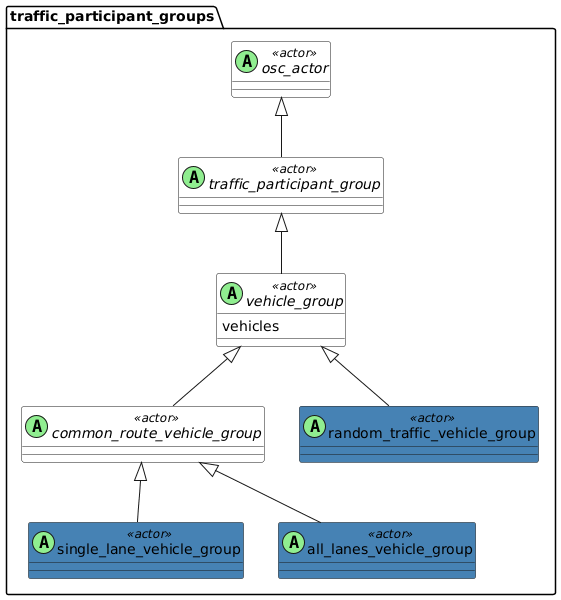
8.7.26.1 Actor vehicle_group
A traffic_participant_group serves as a collection of traffic_participant actors. A group represents multiple actor instances with multiple definitions and states.
There are two main use cases for vehicle groups:
-
Adding entities to a scenario to have more participants in the scenario. By generating multiple vehicles in the surrounding environment of the scenario these vehicles act as 'noise' in the scenario.
-
Creating multiple vehicles with predefined initial conditions.
For example, creating a single-lane or convoy formation of vehicles, or both.
Initial conditions of actors and the actual behavior of actors throughout the scenarios differ:
-
The group defines the initial conditions of actors in the scenario, meaning their creation and destruction.
-
The behavioral model assigned to each vehicle defines the actual behavior of the vehicle within the group.
- Basic information
-
Table 84. Basic information of actor vehicle_group Instantiable
no
Parents
traffic_participant_group
Children
common_route_vehicle_group, random_traffic_vehicle_group
- Parameters
-
Table 85. Actor vehicle_group Parameter Type Mandatory Description vehicles
list of vehicle
yes
List of vehicles being part of this group.
8.7.26.1.1 Examples
scenario dut.driving_alongside_group:
    # Defining a group with a common route and
    # a single-lane formation
    g: single_lane_vehicle_group

    # Using 'for' constraint to control vehicles
    # parameters
    for v in g.vehicles:
        keep(v.category in [bus, truck])

    r: route

    do parallel:
        g.drive() with:
            along(r)
            lane(side_of: dut.vehicle, at: start)
        dut.vehicle.drive() with:
            along(r)