8.8 Movement actions
8.8.1 Action parent class
All actions have the properties stipulated in the language section on actions.
These include pre-defined events like start, end, and fail events, as well as the optional duration parameter.
Actions can also be associated with an actor.
The parent action osc_action is the base class for all actions in the ASAM OpenSCENARIO domain model and it is associated with the parent actor osc_actor.
This allows users to make user-defined extensions of osc_action that can propagate common properties to all standard actions.
In addition, users can create their own actions and are free to choose whether those user-defined actions inherit from osc_action or not.
The action action_for_movable_object is the base class for all movement-related actions and modifiers.
Actions for actors that are children of movable_object, like vehicle or person, inherit from action_for_movable_object.
This allows users to extend these abstract classes, adding common action parameters at different levels within the standard action hierarchy.
Furthermore, it allows users to place their user-defined actions at an appropriate location within the standard action hierarchy, depending on which types of actors are intended to execute each action.
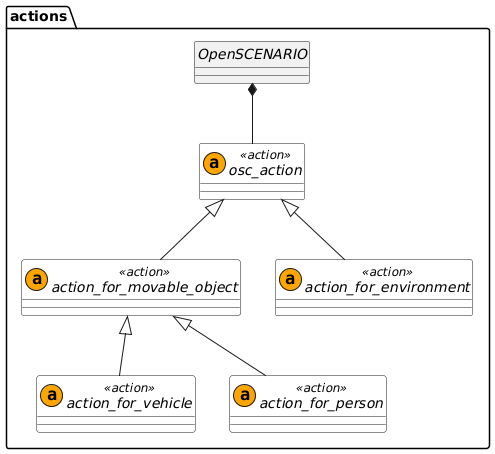
Generic movement actions have the following inheritance structure:
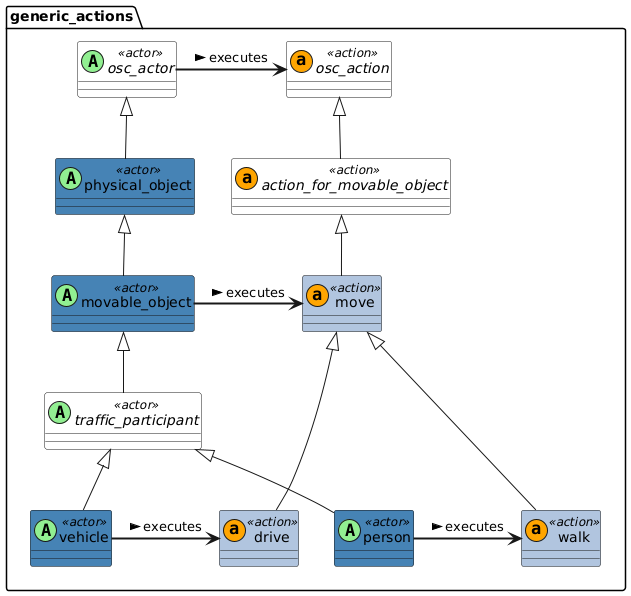
The definition of each data class can be found in the next sections.
8.8.2 Actions for movable object
The movable_object class is a parent for any physical object that could change position during a scenario.
This section defines the actions that can be executed by actors of the movable_object type or any of its children like vehicle, person, and animal.
movable_object encompasses a wide subset of children.
It has a variety of actions available to specify their motion.
The actions that can be executed by movable_object types and their children can be split in two groups:
-
Section 8.8.2.1, “Exact behavior”
Actions where the priority is to achieve the exact values that are specified in the action parameters, regardless of the physical movement constraints of the actor. -
Section 8.8.2.2, “Target behavior”
Actions where the priority is to respect the physical movement constraints of the actor, while getting as close as possible to the target values that are specified in the action parameters.
This distinction can be explicitly stated using the physical_movement() modifier.
See section Modifier 'physical_movement()' for details.
8.8.2.1 Exact behavior
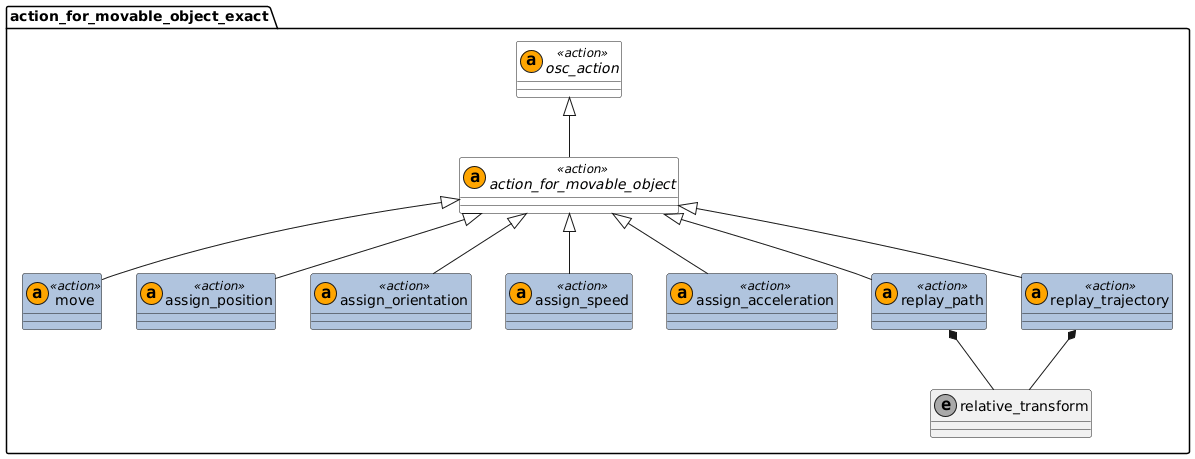
Figure 23 shows the actions that prioritize exact reproduction.
-
These actions use the semantics of the modifier
physical_movement(prefer_non_physical). -
For the execution of these actions an ASAM OpenSCENARIO implementation may choose to violate the physical movement constraints of the actor.
8.8.2.2 Target behavior
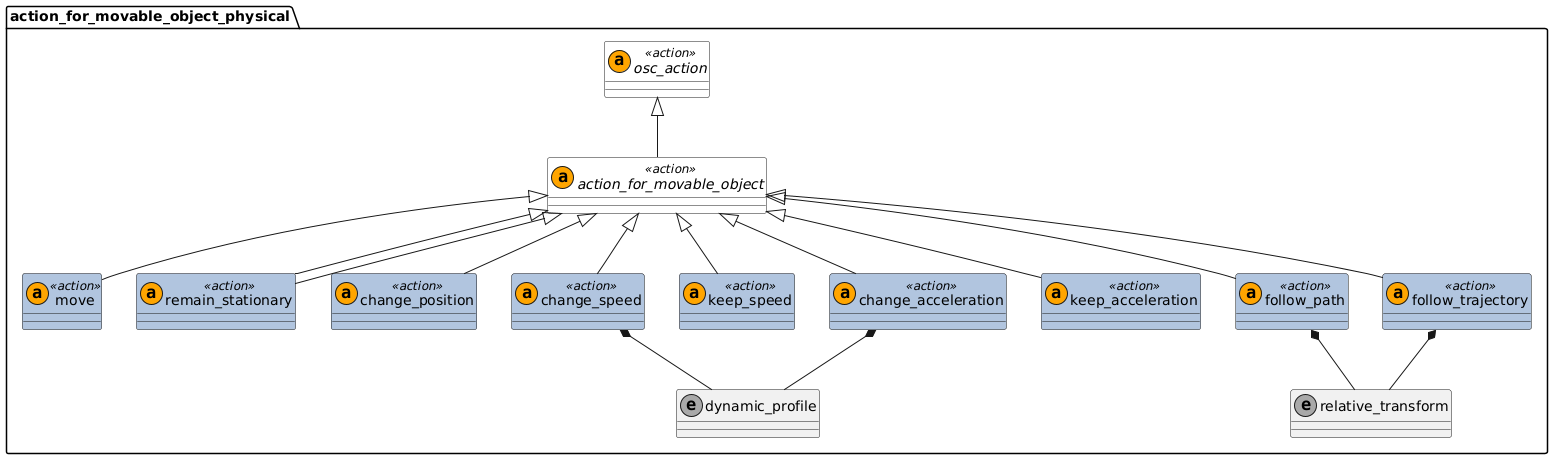
Figure 24 shows actions that prioritize respecting the physical movement constraints of the actor.
-
These actions use the semantics of the modifier
physical_movement(must_be_physical). -
The physical movement constraints of the actor shall not be violated while executing these actions.
-
The actor should get as close as possible to the target values specified in the action parameters.
-
When a scenario is executed, there may be a difference between the observed motion values and the target values.
-
These discrepancies might also depend on the type of execution platform. For example, a simple dynamic simulation compared to a complex dynamic simulation or real vehicle on a test track.
8.8.2.3 Action move
Generic action to initiate the motion of movable objects. Usually invoked in combination with modifiers. Note that different movable objects have different move actions like drive and walk. The nature of the movement is modified according to the moving actor. For example, a vehicle.drive will drive as a vehicle according to road network
- Basic information
-
Table 87. Basic information of action move Parents
action_for_movable_object
Controlled states
None directly. Depends on the modifiers
Action ending
The action ends when the phase in which the action is invoked is terminated.
8.8.2.3.1 Examples
movable_object.move([, <inherited action parameters>])# Move at 10 kph, with starting position relative to my_car
my_box.move() with:
position(10m, ahead_of: my_car, at: start)
lateral(2m, side: left, side_of: my_car, at: start)
speed(10kph)
# Move to position in front of my_car and stop, with duration 3 seconds
my_box.move(duration: 3s) with:
speed(0kph, at: end)
position(3m, ahead_of: my_car, at: end)
lateral(0.2m, side_of: my_car, at: end)8.8.2.4 Action assign_position
Move actor to the specified position as soon as possible. The dynamic limits of the actor may be violated to execute this action. Use only one of the three possible arguments.
- Basic information
-
Table 88. Basic information of action assign_position Parents
action_for_movable_object
Controlled states
Only the position states that are specified in the invocation
Action ending
The action ends when the actor reaches the specified position coordinates
- Parameters
-
Table 89. Action assign_position Parameter Type Mandatory Description position
no
Desired position assigned by the user
no
Desired route_point assigned by the user
no
Desired odr_point assigned by the user
8.8.2.4.1 Examples
movable_object.assign_position(position: position_3d [, <inherited action parameters>])

movable_object.assign_position(route_point: route_point [, <inherited action parameters>])

movable_object.assign_position(odr_point: odr_point [, <inherited action parameters>])action movable_object.assign_position:
position: position_3d
route_point: route_point
odr_point: odr_point
# The position() and lateral() modifiers use route coordinates
# Convert position or odr_point arguments to route_point
if odr_point:
route_point: route_point = map.odr_to_route_point(odr_point.road_id, odr_point.lane_id, odr_point.s, odr_point.t)
else if position:
route_point: route_point = map.xyz_to_route_point(position.x, position.y, position.z)
do move() with:
along(route_point.route)
position(route_point.s, at: end)
lateral(route_point.t, at: end)
physical_movement(prefer_non_physical)# Using global x-y-z coordinates
my_pos: position_3d # Add constraints for fields of my_pos
do:
my_car.assign_position(my_pos)
# Same as:
my_car.assign_position(position: my_pos)
# Using route s-t coordinates
my_st: route_point # Add constraints for fields of my_st
do:
my_car.assign_position(route_point: my_st)
# Using odr coordinates
my_car: vehicle
my_odr: odr_point # Add constraints for fields of my_odr
do:
my_car.assign_position(odr_point: my_odr)8.8.2.5 Action assign_orientation
Move actor to the specified orientation as soon as possible. The dynamic limits of the actor may be violated to execute this action.
- Basic information
-
Table 90. Basic information of action assign_orientation Parents
action_for_movable_object
Controlled states
Only the orientation states that are specified in the invocation
Action ending
The action ends when the actor reaches the specified orientation coordinates
- Parameters
-
Table 91. Action assign_orientation Parameter Type Mandatory Description orientation
yes
Desired 3-dimensional orientation assigned by the user
8.8.2.5.1 Examples
movable_object.assign_orientation(orientation: orientation_3d [, <inherited action parameters>])action movable_object.assign_orientation:
orientation: orientation_3d
do move() with:
orientation(yaw: orientation.yaw, pitch: orientation.pitch, roll: orientation.roll, at: end)
physical_movement(prefer_non_physical)my_orientation: orientation_3d # Add constraints for fields of my_orientation
do:
my_car.assign_orientation(my_orientation)
# Same as:
my_car.assign_orientation(orientation: my_orientation)8.8.2.6 Action assign_speed
Move actor to achieve the specified scalar speed as soon as possible. The dynamic limits of the actor may be violated to execute this action.
- Basic information
-
Table 92. Basic information of action assign_speed Parents
action_for_movable_object
Controlled states
Scalar longitudinal speed of actor
Action ending
The action ends when the actor reaches the specified velocity value
- Parameters
-
Table 93. Action assign_speed Parameter Type Mandatory Description speed
yes
Desired (scalar) speed assigned by the user
8.8.2.6.1 Examples
movable_object.assign_speed(speed: speed [, <inherited action parameters>])action movable_object.assign_speed:
speed: speed
do move() with:
speed(speed, at: end)
physical_movement(prefer_non_physical)my_car.assign_speed(35kph)
my_car.assign_speed(speed: 35kph)8.8.2.7 Action assign_acceleration
Move actor to achieve the specified acceleration as soon as possible. The dynamic limits of the actor may be violated to execute this action.
- Basic information
-
Table 94. Basic information of action assign_acceleration Parents
action_for_movable_object
Controlled states
Scalar longitudinal acceleration of actor
Action ending
The action ends when the actor reaches the specified acceleration value
- Parameters
-
Table 95. Action assign_acceleration Parameter Type Mandatory Description acceleration
yes
Desired (scalar) acceleration assigned by the user
8.8.2.7.1 Examples
movable_object.assign_acceleration(acceleration: acceleration[, <inherited action parameters>])action movable_object.assign_acceleration:
acceleration: acceleration
do move() with:
acceleration(target, at: end)
physical_movement(prefer_non_physical)my_car.assign_acceleration(1.0mpsps)
my_car.assign_acceleration(acceleration: 1.0mpsps)8.8.2.8 Action replay_path
The actor moves along the path coordinates exactly, with no deviations. If necessary, the motion model or dynamic limits of the actor may be violated to reproduce the path accurately.
- Basic information
-
Table 96. Basic information of action replay_path Parents
action_for_movable_object
Controlled states
The position and orientation of the actor are controlled so that they match those prescribed by the path at all times. The speed and acceleration of the actor along the path are uncontrolled. These can be controlled by other actions.
Action ending
The action ends when the actor passes the last point of the path
- Parameters
-
Table 97. Action replay_path Parameter Type Mandatory Description absolute
yes
Absolute path. Includes a list of points
relative
yes
Relative path. Includes a list of points
reference
no
Use with relative paths. Specify the reference entity that defines the origin for the point coordinates. Default: the actor itself
transform
no
Use with relative paths. Coordinates of the points are relative to the reference entity. Default = object_relative
start_offset
no
Offset at which to begin following the path, measured from the start of the path. Default = 0m
end_offset
no
Offset at which to end following the path, measured from the end of the path. Default = 0m
8.8.2.8.1 Examples
movable_object.replay_path(absolute: path
[, start_offset: length] [, end_offset: length] [, <inherited action parameters>])

movable_object.replay_path(relative: relative_path, reference: physical_object, transform: relative_transform,
[, start_offset: length] [, end_offset: length] [, <inherited action parameters>])action movable_object.replay_path:
absolute: path
relative: relative_path
reference: physical_object with:
keep(default it == replay_path.actor)
transform: relative_transform with:
keep(default it == object_relative)
start_offset: length with:
keep(default it == 0m)
end_offset: length with:
keep(default it == 0m)
if (relative):
exact_absolute: path = map.resolve_relative_path(relative, reference, transform)
else if (absolute):
exact_absolute: path = absolute
do move() with:
along(exact_absolute, start_offset: start_offset, end_offset: end_offset)
physical_movement(prefer_non_physical)# Using an absolute path
my_abs_path: path # Add constraints for fields of my_abs_path
# Absolute path -- simple invocation
do:
my_car.replay_path(absolute: my_abs_path)
# Absolute path -- with offset parameters
do:
my_car.replay_path(absolute: my_abs_path, start_offset: 2.0m, end_offset: 0.5m)
# Using a relative path
my_rel_path: relative_path_pose_3d # Add constraints for fields of my_rel_path
# Can also use types relative_path_st, relative_path_odr
# Relative path -- simple invocation
do:
my_car.replay_path(relative: my_rel_path)
# Uses default values for parameters 'reference' and 'transform'
# Relative path -- identical semantics to simple invocation
do:
my_car.replay_path(relative: my_rel_path, reference: my_car, transform: object_relative)
# Relative path -- override default parameters
do:
my_car.replay_path(relative: my_rel_path, reference: other_car, transform: world_relative)
# Relative path -- with offset options
do:
my_car.replay_path(relative: my_rel_path, start_offset: 2.0m, end_offset: 0.5m)
# Uses default values for parameters 'reference' and 'transform'8.8.2.9 Action replay_trajectory
The actor moves by executing the trajectory exactly. If necessary, the motion model or dynamic limits of the actor may be violated to accurately follow the trajectory.
- Basic information
-
Table 98. Basic information of action replay_trajectory Parents
action_for_movable_object
Controlled states
All motion states (position, velocity, and acceleration, lateral and longitudinal) of the actor
Action ending
The action ends when the actor passes the last point of the trajectory
- Parameters
-
Table 99. Action replay_trajectory Parameter Type Mandatory Description absolute
yes
Absolute trajectory. Includes a list of points and a list of corresponding time stamps
relative
yes
Relative trajectory. Includes a list of points and a list of corresponding time stamps
reference
no
Use with relative trajectories. Specify the reference entity that defines the origin for the point coordinates. Default: the actor itself
transform
no
Use with relative trajectories. Coordinates of the points are relative to the reference entity. Default = object_relative
start_offset
no
Offset at which to begin following the trajectory, measured from the start of the trajectory. Default = 0m
end_offset
no
Offset at which to end following the trajectory, measured from the end of the trajectory. Default = 0m
8.8.2.9.1 Examples
movable_object.replay_trajectory(absolute: trajectory
[, start_offset: length] [, end_offset: length] [, <inherited action parameters>])

movable_object.replay_trajectory(relative: relative_trajectory, reference: physical_object, transform: relative_transform,
[, start_offset: length] [, end_offset: length] [, <inherited action parameters>])action movable_object.replay_trajectory:
absolute: trajectory
relative: relative_trajectory
reference: physical_object with:
keep(default it == replay_trajectory.actor)
transform: relative_transform with:
keep(default it == object_relative)
start_offset: length with:
keep(default it == 0m)
end_offset: length with:
keep(default it == 0m)
if (relative):
exact_absolute: trajectory = map.resolve_relative_trajectory(relative, reference, transform)
else if (absolute):
exact_absolute: trajectory = absolute
do move() with:
along_trajectory(exact_absolute, start_offset: start_offset, end_offset: end_offset)
physical_movement(prefer_non_physical)# Using an absolute trajectory
my_abs_traj: trajectory # Add constraints for fields of my_abs_traj
# Absolute trajectory -- simple invocation
do:
my_car.replay_trajectory(absolute: my_abs_traj)
# Absolute trajectory -- with offset parameters
do:
my_car.replay_trajectory(absolute: my_abs_traj, start_offset: 2.0m, end_offset: 0.5m)
# Using a relative trajectory
my_rel_traj: relative_trajectory_pose_3d # Add constraints for fields of my_rel_traj
# Can also use types relative_trajectory_st, relative_trajectory_odr
# Relative trajectory -- simple invocation
do:
my_car.replay_trajectory(relative: my_rel_traj)
# Uses default values for parameters 'reference' and 'transform'
# Relative trajectory -- identical semantics to simple invocation
do:
my_car.replay_trajectory(relative: my_rel_traj, reference: my_car, transform: object_relative)
# Relative trajectory -- override default parameters
do:
my_car.replay_trajectory(relative: my_rel_traj, reference: other_car, transform: world_relative)
# Relative trajectory -- with offset options
do:
my_car.replay_trajectory(relative: my_rel_traj, start_offset: 2.0m, end_offset: 0.5m)
# Uses default values for parameters 'reference' and 'transform'8.8.2.10 Action remain_stationary
The actor must remain stationary at its current position. The actor must hold a translational speed of zero in all directions throughout the whole action. This action may be used to differentiate stationary behavior from dynamic behavior. In order to explicitly set a target position, the action must be invoked together with at least one or any combination of the position(), lateral() or along() modifiers.
- Basic information
-
Table 100. Basic information of action remain_stationary Parents
action_for_movable_object
Controlled states
All translational states. Translational speed must be zero in all directions.
Action ending
The action ends when the phase in which the action is invoked is terminated.
8.8.2.10.1 Examples
movable_object.remain_stationary([, <inherited action parameters>])action movable_object.remain_stationary:
do move() with:
keep_position()
speed(speed: 0kph, at: all)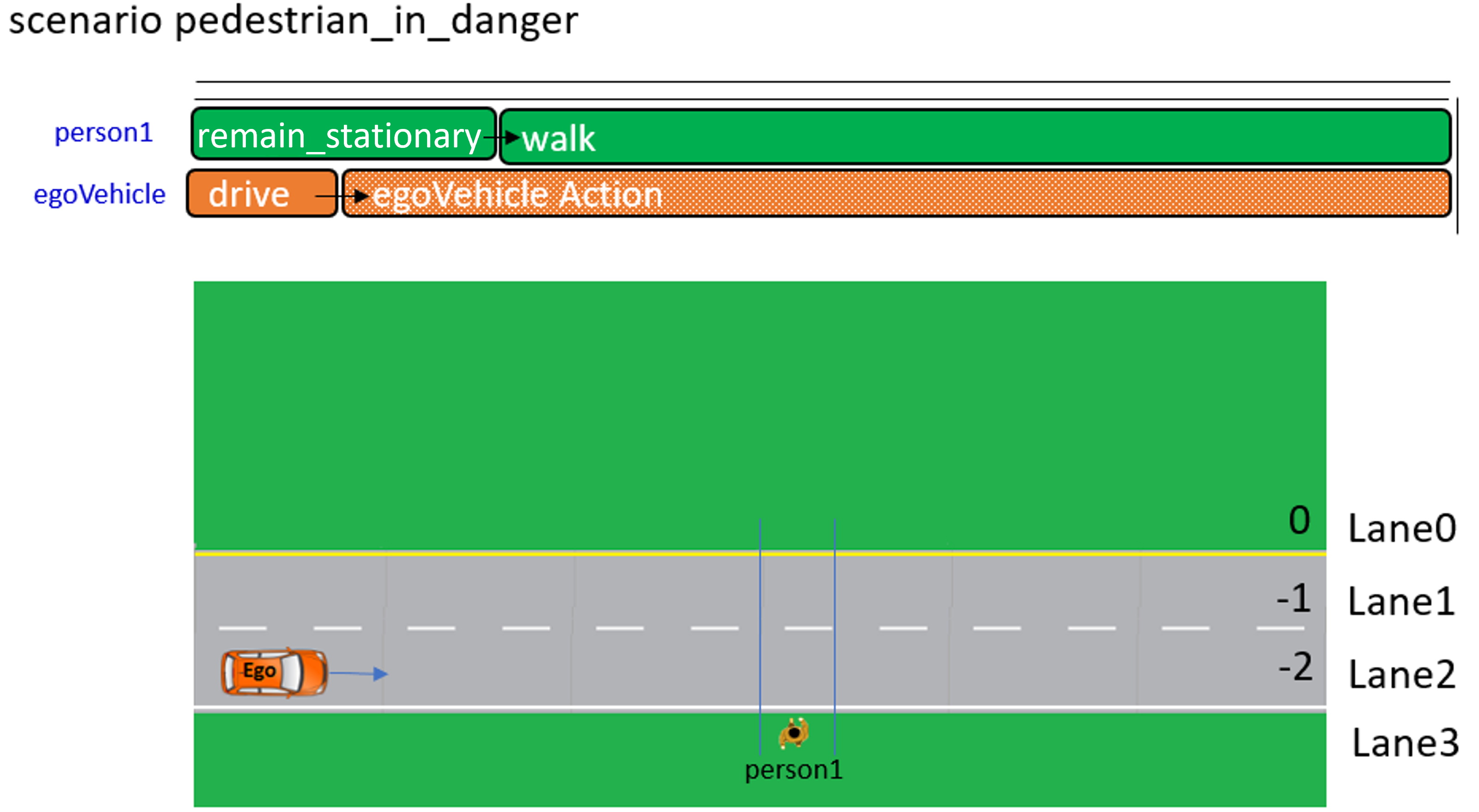
scenario pedestrian_in_danger:
    person1: person
    egoVehicle: vehicle
    my_map: map

    ego_start_speed: speed = 50kph
    ego_start_distance: length = 5m
    person1_start_distance: length = 0m
    person1_target_speed: speed = 2kph
    ego_route: lane_section
    lane3: lane
    lane0: lane

    crossing1: crossing with:
        keep(it.width == 3.5m)
    my_map.crossing_connects(crossing1,
        start_lane: lane3,
        end_lane: lane0,
        start_s_coord: 55m,
        start_angle: 90deg)

    event event1 is person1.space_gap(egoVehicle, longitudinal) <= 7m
    event event2 is person1.distance_along_route(route: crossing1, from: from_end) == 0m

    do parallel:
        ego: egoVehicle.drive() with:
            along(ego_route, start_offset: ego_start_distance)
            lane(2)
            speed(ego_start_speed, at: start)
        person1_activity: serial:
            person1.remain_stationary() with:
                along(crossing1, start_offset: person1_start_distance)
                until: @event1
            person1.walk() with:
                change_speed(person1_target_speed, at: end)
                until: @event2
8.8.2.11 Action change_position
Creates a path from the current position of the actor to the target position. The actor follows this path. The motion model and dynamic limits of the actor should not be violated while executing this action.
- Basic information
-
Table 101. Basic information of action change_position Parents
action_for_movable_object
Controlled states
The speed and acceleration at which the actor moves along the path to the target position are free (can be controlled by other actions). All other motion states are controlled by this action
Action ending
The action ends when the actor reaches the target position.
- Parameters
-
Table 102. Action change_position Parameter Type Mandatory Description target_position
yes
Target position at the end of the action
target_st
yes
Target value for the position at the end of the action in s-t-coordinates
target_odr
yes
Target value for the position at the end of the action in odr coordinates
target_xyz
yes
Target value for the position at the end of the action in x-y-z-coordinates. Deprecated, use target_position instead
interpolation
yes
The interpolation method used to join the start and end points
on_road_network
bool
yes
The action takes place completely on the road network of the scenario
8.8.2.11.1 Examples
movable_object.change_position(target_xyz: position_3d, interpolation: path_interpolation, on_road_network: bool
[, <inherited action parameters>])

movable_object.change_position(target_st: route_point, interpolation: path_interpolation, on_road_network: bool
[, <inherited action parameters>])

movable_object.change_position(target_odr: odr_point, interpolation: path_interpolation, on_road_network: bool
[, <inherited action parameters>])action movable_object.change_position:
target_xyz: position_3d
target_st: route_point
target_odr: odr_point
interpolation: path_interpolation
on_road_network: bool
# The position() and lateral() modifiers use route coordinates
# Convert target_xyz or target_odr arguments to route_point
if target_odr:
target_st: route_point = map.odr_to_route_point(target_odr.road_id, target_odr.lane_id, target_odr.s, target_odr.t)
else if taget_xyz:
target_st: route_point = map.xyz_to_route_point(target_xyz.x, target_xyz.y, target_xyz.z)
# The initial position of the actor is sampled when the action is invoked
# start_st is not a parameter of the action
# It is only used here to illustrate the logic of the semantic clarifier
start_st: route_point = actor.get_route_point()
# Create a path from the initial position to the target position
# action_path is not a parameter of the action
# It is only used here to illustrate the logic of the semantic clarifier
action_path: path = map.create_path_route_points([start_st, target_st], interpolation, on_road_network)
do move() with:
along(action_path)
position(target_st.s, at: end)
lateral(target_st.t, at: end)
physical_movement(must_be_physical)# Using global x-y-z coordinates
# Move in straight line, ignoring road network
my_pos: position_3d # Add constraints for fields of my_pos
do:
my_car.change_position(my_pos, straight_line, False)
# Same as:
my_car.change_position(target_xyz: my_pos, interpolation: smooth, on_road_network: False)
# Using route s-t coordinates
# Move along a smooth path, using road network
my_st: route_point # Add constraints for fields of my_st
do:
my_car.change_position(target_st: my_st, interpolation: smooth, on_road_network: True)
# Using odr coordinates
# Move in straight line, using road network
my_car: vehicle
my_odr: odr_point # Add constraints for fields of my_odr
do:
my_car.change_position(target_odr: my_odr, interpolation: smooth, on_road_network: True)8.8.2.12 Action change_speed
The actor modifies its speed until the target speed is achieved. The motion model and dynamic limits of the actor should not be violated while executing this action.
- Basic information
-
Table 103. Basic information of action change_speed Parents
action_for_movable_object
Controlled states
Scalar longitudinal speed of actor
Action ending
The action ends when the actor reaches the target speed. Note the alternative keep_speed action.
- Parameters
-
Table 104. Action change_speed Parameter Type Mandatory Description target
yes
Target value for the speed at the end of the action
rate_profile
no
Assign a shape for the change of the speed variable. This profile affects the acceleration during action execution
rate_peak
no
Target value for the peak acceleration that must be achieved during the action
8.8.2.12.1 Examples
movable_object.change_speed(target: speed
[, rate_profile: dynamic_profile [, rate_peak: acceleration]] [, <inherited action parameters>])action movable_object.change_speed:
target: speed
rate_profile: dynamic_profile with:
keep(default it == none)
rate_peak: acceleration
# spd_shape is not a parameter of the action
# It is only used here to illustrate the logic of the semantic clarifier
spd_shape: common_speed_shape with:
keep(it.target == target)
keep(it.rate_profile == rate_profile)
keep(it.rate_peak == rate_peak)
do move() with:
if rate_profile == none:
speed(target, at: end)
else:
speed(shape: spd_shape)| Here, and in other semantic clarifications, there is usage of the if directive. This directive is not defined in ASAM OpenSCENARIO and is used here for illustrative purposes. |
# Reach target -- only mandatory parameters are specified
car2.change_speed(35kph)

# Reach target as soon as possible
car2.change_speed(35kph, asap)

# Reach target with smooth acceleration
car2.change_speed(35kph, smooth)

# Reach target with constant acceleration of 3 m/s/s
car2.change_speed(35kph, constant, 3.0meter_per_sec_sqr)

# Reach target in 3 seconds
car2.change_speed(35kph, duration: 3.0sec)

# Reach target in 3 seconds, keeping a constant acceleration
car2.change_speed(35kph, duration: 3.0sec, rate_profile: constant)
8.8.2.13 Action keep_speed
The actor keeps its speed until the action is terminated. The motion model and dynamic limits of the actor should not be violated while executing this action.
- Basic information
-
Table 105. Basic information of action keep_speed Parents
action_for_movable_object
Controlled states
Scalar longitudinal speed of actor.
Action ending
The action ends when the phase in which the action is invoked is terminated. Note the alternative change_speed action.
8.8.2.13.1 Examples
movable_object.keep_speed([, <inherited action parameters>])action movable_object.keep_speed:
do move() with:
keep_speed()# First go to 35kph and then keep this speed
do serial:
my_car.change_speed(35kph)
my_car.keep_speed()8.8.2.14 Action change_acceleration
The actor modifies its acceleration until the target is reached. The motion model and dynamic limits of the actor should not be violated while executing this action.
- Basic information
-
Table 106. Basic information of action change_acceleration Parents
action_for_movable_object
Controlled states
Scalar longitudinal acceleration of the actor.
Action ending
The action ends when the actor reaches the target scalar acceleration. Note the alternative keep_acceleration action.
- Parameters
-
Table 107. Action change_acceleration Parameter Type Mandatory Description target
yes
Target value for the scalar acceleration at the end of the action
rate_profile
no
Assign a shape for the change of the speed variable. This profile affects the jerk during action execution
rate_peak
no
Target value for the peak jerk that must be achieved during the action
8.8.2.14.1 Examples
movable_object.change_acceleration(target: acceleration
[, rate_profile: dynamic_profile [, rate_peak: jerk]] [, <inherited action parameters>])action movable_object.change_acceleration:
target: acceleration
rate_profile: dynamic_profile with:
keep(default it == none)
rate_peak: jerk
# accel_shape is not a parameter of the action
# It is only used here to illustrate the logic of the semantic clarifier
accel_shape: common_acceleration_shape with:
keep(it.target == target)
keep(it.rate_profile == rate_profile)
keep(it.rate_peak == rate_peak)
do move() with:
if rate_profile == none:
acceleration(target, at: end)
else:
acceleration(shape: accel_shape)| Here, and in other semantic clarifications, there is usage of the if directive. This directive is not defined in ASAM OpenSCENARIO and is used here for illustrative purposes. |
# Reach target -- only mandatory parameters are specified
car2.change_acceleration(1.0mpsps)

# Reach target as soon as possible
car2.change_acceleration(1.0mpsps, asap)

# Reach target with smooth jerk
car2.change_acceleration(1.0mpsps, smooth)

# Reach target with constant jerk of 2m/s/s/s
car2.change_acceleration(-2.0meter_per_sec_sqr, constant, 2.0meter_per_sec_cubed)

# Reach target in 2 seconds
car2.change_acceleration(3.0mpsps, duration: 2.0sec)

# Reach target in 2 seconds, keeping a constant jerk
car2.change_acceleration(3.0mpsps, duration: 2.0sec, rate_profile: constant)
8.8.2.15 Action keep_acceleration
The actor keeps its acceleration until the action is terminated. The motion model and dynamic limits of the actor should not be violated while executing this action.
- Basic information
-
Table 108. Basic information of action keep_acceleration Parents
action_for_movable_object
Controlled states
Scalar longitudinal acceleration of the actor.
Action ending
The action ends when the phase in which the action is invoked is terminated. Note the alternative change_acceleration action.
8.8.2.15.1 Examples
movable_object.keep_acceleration([, <inherited action parameters>])action movable_object.keep_acceleration:
do move() with:
keep_acceleration()# Accelerate up to 3 mpsps, keep this acceleration for 2 seconds and then reduce acceleration until it reaches zero
do serial:
my_car.change_acceleration(3.0mpsps)
my_car.keep_acceleration(duration: 2.0sec)
my_car.change_acceleration(0.0mpsps)8.8.2.16 Action follow_path
The actor follows the target path as closely as possible, according to the motion model and dynamic limits of the actor. The motion model and dynamic limits should not be violated while executing this action. This means that, after executing the scenario, the observed path may have differences to the target path.
- Basic information
-
Table 109. Basic information of action follow_path Parents
action_for_movable_object
Controlled states
The speed and acceleration at which the actor moves along the path are free (can be controlled by other actions). All other motion states are controlled by this action
Action ending
The action ends when the actor passes the last point of the path
- Parameters
-
Table 110. Action follow_path Parameter Type Mandatory Description absolute
yes
Absolute path. Includes a list of points
relative
yes
Relative path. Includes a list of points
reference
no
Use with relative paths. Specify the reference entity that defines the origin for the point coordinates. Default: the actor itself
transform
no
Use with relative paths. Coordinates of the points are relative to the reference entity. Default = object_relative
start_offset
no
Offset at which to begin following the path, measured from the start of the path. Default = 0m
end_offset
no
Offset at which to end following the path, measured from the end of the path. Default = 0m
8.8.2.16.1 Examples
movable_object.follow_path(absolute: path
[, start_offset: length] [, end_offset: length] [, <inherited action parameters>])

movable_object.follow_path(relative: relative_path, reference: physical_object, transform: relative_transform,
[, start_offset: length] [, end_offset: length] [, <inherited action parameters>])action movable_object.follow_path:
absolute: path
relative: relative_path
reference: physical_object with:
keep(default it == follow_path.actor)
transform: relative_transform with:
keep(default it == object_relative)
start_offset: length with:
keep(default it == 0m)
end_offset: length with:
keep(default it == 0m)
if (relative):
target_absolute: path = map.resolve_relative_path(relative, reference, transform)
else if (absolute):
target_absolute: path = absolute
do move() with:
along(target_absolute, start_offset: start_offset, end_offset: end_offset)
physical_movement(must_be_physical)# Using an absolute path
my_abs_path: path # Add constraints for fields of my_abs_path
# Absolute path -- simple invocation
do:
my_car.follow_path(absolute: my_abs_path)
# Absolute path -- with offset parameters
do:
my_car.follow_path(absolute: my_abs_path, start_offset: 2.0m, end_offset: 0.5m)
# Using a relative path
my_rel_path: relative_path_pose_3d # Add constraints for fields of my_rel_path
# Can also use types relative_path_st, relative_path_odr
# Relative path -- simple invocation
do:
my_car.follow_path(relative: my_rel_path)
# Uses default values for parameters 'reference' and 'transform'
# Relative path -- identical semantics to simple invocation
do:
my_car.follow_path(relative: my_rel_path, reference: my_car, transform: object_relative)
# Relative path -- override default parameters
do:
my_car.follow_path(relative: my_rel_path, reference: other_car, transform: world_relative)
# Relative path -- with offset options
do:
my_car.follow_path(relative: my_rel_path, start_offset: 2.0m, end_offset: 0.5m)
# Uses default values for parameters 'reference' and 'transform'8.8.2.17 Action follow_trajectory
The actor follows the target trajectory as closely as possible, according to the motion model and dynamic limits of the actor. The motion model and dynamic limits should not be violated while executing this action. This means that, after executing the scenario, the observed trajectory may have differences (tracking errors) with respect to the target trajectory.
- Basic information
-
Table 111. Basic information of action follow_trajectory Parents
action_for_movable_object
Controlled states
All motion states (position, velocity, and acceleration, lateral and longitudinal) of the actor
Action ending
The action ends when the actor passes the last point of the trajectory
- Parameters
-
Table 112. Action follow_trajectory Parameter Type Mandatory Description absolute
yes
Absolute trajectory. Includes a list of points and a list of corresponding time stamps
relative
yes
Relative trajectory. Includes a list of points and a list of corresponding time stamps
reference
no
Use with relative trajectories. Specify the reference entity that defines the origin for the point coordinates. Default: the actor itself
transform
no
Use with relative trajectories. Coordinates of the points are relative to the reference entity. Default = object_relative
start_offset
no
Offset at which to begin following the trajectory, measured from the start of the trajectory. Default = 0m
end_offset
no
Offset at which to end following the trajectory, measured from the end of the trajectory. Default = 0m
8.8.2.17.1 Examples
movable_object.follow_trajectory(absolute: trajectory
[, start_offset: length] [, end_offset: length] [, <inherited action parameters>])

movable_object.follow_trajectory(relative: relative_trajectory, reference: physical_object, transform: relative_transform,
[, start_offset: length] [, end_offset: length] [, <inherited action parameters>])action movable_object.follow_trajectory:
absolute: trajectory
relative: relative_trajectory
reference: physical_object with:
keep(default it == follow_trajectory.actor)
transform: relative_transform with:
keep(default it == object_relative)
start_offset: length with:
keep(default it == 0m)
end_offset: length with:
keep(default it == 0m)
if (relative):
target_absolute: trajectory = map.resolve_relative_trajectory(relative, reference, transform)
else if (absolute):
target_absolute: trajectory = absolute
do move() with:
along_trajectory(target_absolute, start_offset: start_offset, end_offset: end_offset)
physical_movement(must_be_physical)# Using an absolute trajectory
my_abs_traj: trajectory # Add constraints for fields of my_abs_traj
# Absolute trajectory -- simple invocation
do:
my_car.follow_trajectory(absolute: my_abs_traj)
# Absolute trajectory -- with offset parameters
do:
my_car.follow_trajectory(absolute: my_abs_traj, start_offset: 2.0m, end_offset: 0.5m)
# Using a relative trajectory
my_rel_traj: relative_trajectory_pose_3d # Add constraints for fields of my_rel_traj
# Can also use types relative_trajectory_st, relative_trajectory_odr
# Relative trajectory -- simple invocation
do:
my_car.follow_trajectory(relative: my_rel_traj)
# Uses default values for parameters 'reference' and 'transform'
# Relative trajectory -- identical semantics to simple invocation
do:
my_car.follow_trajectory(relative: my_rel_traj, reference: my_car, transform: object_relative)
# Relative trajectory -- override default parameters
do:
my_car.follow_trajectory(relative: my_rel_traj, reference: other_car, transform: world_relative)
# Relative trajectory -- with offset options
do:
my_car.follow_trajectory(relative: my_rel_traj, start_offset: 2.0m, end_offset: 0.5m)
# Uses default values for parameters 'reference' and 'transform'8.8.2.18 Enum dynamic_profile
- Basic information
-
Table 113. Basic information of enum dynamic_profile Used by
- Values
-
Table 114. Enum dynamic_profile Value Comment none
No specific dynamic profile
constant
Use constant first derivative
smooth
Use smooth first derivative
asap
Reach value as soon as possible
8.8.3 Actions for vehicle
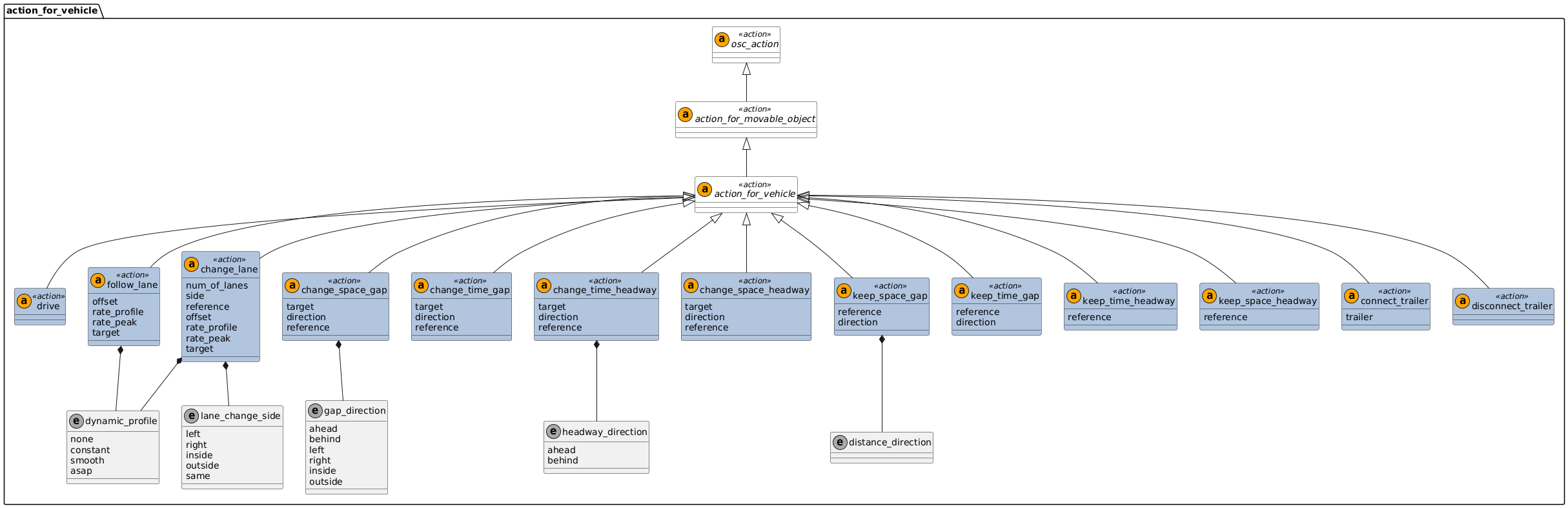
The following actions are specifically for actors of type vehicle.
Additionally, a vehicle can execute any of the actions of the classes they inherit from, like the action_for_movable_object.
This also means, that a vehicle can be instructed to move on a route with the along() modifier.
The children of action_for_vehicle are intended to be executed by actors that have an inherent dynamic behavior.
This inherent dynamic behavior should have physical movement constraints that are typical for vehicles.
The arguments in the actions for vehicle specify the target values for the state variables of the actor during the scenario. However, during execution of the action, the observed values for these state variables might differ from the target values.
The dynamic constraints of the vehicle should not be violated while executing these actions, unless this is explicitly stated otherwise in the scenario description (for example, by using the physical_movement() modifier).
8.8.3.1 Action drive
Generic action to initiate the motion of vehicles. Usually invoked in combination with modifiers.
- Basic information
-
Table 115. Basic information of action drive Parents
action_for_vehicle
Controlled states
None directly. Depends on the modifiers. See chapter on modifiers.
Action ending
The action ends when the phase in which the action is invoked is terminated.
8.8.3.1.1 Examples
vehicle.drive([, <inherited action parameters>])# Speed target of 30km/h for the end of the action, with constant acceleration
my_car.drive() with:
speed(30kph, at: end)
acceleration(5kphps)
# Drive for 30 seconds at 50km/h along road "my_road" with starting position relative to other_car
my_car.drive(duration: 30s) with:
speed(50kph)
along(my_road)
position(distance: 20m, behind: other_car, at: start)8.8.3.2 Action follow_lane
The actor shall stay within the boundaries of the lane as long as the action is active. The actor shall be in the same lane from the start to the end of the action.
- Basic information
-
Table 116. Basic information of action follow_lane Parents
action_for_vehicle
Controlled states
Lateral motion of the actor
Action ending
The action ends when the phase in which the action is invoked is terminated.
- Parameters
-
Table 117. Action follow_lane Parameter Type Mandatory Description offset
no
Default=0.0. Offset from center of the lane for the actor to follow, using the t-axis of the lane
rate_profile
no
Assign a shape for the change of the lateral position variable (t-axis). This profile affects the lateral velocity during action execution
rate_peak
no
Target value for the peak lateral velocity that must be achieved during the action
target
no
The actor must be in this lane at the start, throughout, and the end of the action. If this argument is ignored, the actor follows the current lane when the action is invoked
8.8.3.2.1 Examples
vehicle.follow_lane([<inherited action parameters>])

vehicle.follow_lane(offset: length
| offset_range: range of length
[, rate_profile: dynamic_profile [, rate_peak: speed]] [, <inherited action parameters>])

vehicle.follow_lane(target: lane
[, offset: length | offset_range: range of length]
[, rate_profile: dynamic_profile]
[, rate_peak: speed]
[, <inherited action parameters>])
The offset can be given as a scalar value or an admissible offset interval (offset_range).
In the case where the at: directive is at: all (default), if offset_range is specified, the actor’s lateral offset shall remain within the specified range throughout the entire duration of the action.
If offset is specified, the actor’s lateral offset is fixed to the given value for the duration of the action.
It is only allowed to provide at most one of the two parameters, offset or offset_range
action vehicle.follow_lane:
    offset: length with:
        keep(default it == 0m)
    rate_profile: dynamic_profile with:
        keep(default it == none)
    rate_peak: speed

    # empty_lane is not a parameter of the action
    # It is only used here to illustrate the
    empty_lane: lane

    target: lane with:
        keep(default target == empty_lane)

    # lat_shape is not a parameter of the action
    # It is only used here to illustrate the
    lat_shape : common_lateral_shape with:
        keep(it.rate_profile == rate_profile)
        keep(it.rate_peak == rate_peak)
        keep(it.target == offset)

    do drive() with:
        if target == empty_lane:
            keep_lane()
        else:
            lane(lane: target, at: all)

        if rate_profile == none:
            lateral(distance: offset, line: center)
        else:
lateral(shape: lat_shape, line: center)action vehicle.follow_lane:
offset_range: range of length with:
keep(default it == 0m..0m)
...
if rate_profile == none:
lateral(distance_range: offset_range, line: center)
else:
...| Here, and in other semantic clarifications, there is usage of the if directive. This directive is not defined in ASAM OpenSCENARIO and is used here for illustrative purposes. |
# Follow the centerline of the current lane
my_car.follow_lane()
my_car.follow_lane(0.0m)
my_car.follow_lane(offset: 0.0m)

# Follow the centerline of the current lane with duration 30 seconds
my_car.follow_lane(duration: 30s)

# Follow the current lane, with the current lateral offset
my_car.follow_lane(offset: my_car.get_t_coord(on_lane))

# Follow the current lane with a fixed lateral offset...
# ... and move to the target offset using the shape options
my_car.follow_lane(-0.4m, smooth, 0.2mps)
my_car.follow_lane(offset: -0.4m, rate_profile: smooth, rate_peak: 0.2mps)

# Follow a previously declared instance of lane "my_lane"
# If my_car is not in my_lane when the action starts, this should produce an error
my_car.follow_lane(target: my_lane)

# Follow a previously declared instance of lane "my_lane", with a fixed lateral offset
my_car.follow_lane(target: my_lane, offset: 0.3m)

# Follow a previously declared instance of lane "my_lane" with a variable lateral offset
# that may vary between 0.2m and 0.5m throughout the entire action.
my_car.follow_lane(target: my_lane, offset_range: [0.2m..0.5m])

# Follow lane "my_lane" with lateral offset...
# ... and move to offset with constant lateral velocity and duration 1.5 seconds
# The peak_rate (peak lateral velocity) is unconstrained and free for the implementation to decide
my_car.change_lane(target: my_lane, rate_profile: constant, duration: 1.5s)
8.8.3.3 Action change_lane
The actor shall start this action outside of the target lane and move into the target lane by the end of the action. The lane at the end of the action must be different from the lane at the start of the action.
- Basic information
-
Table 118. Basic information of action change_lane Parents
action_for_vehicle
Controlled states
Lateral motion of the actor
Action ending
The action ends when the actor is located in the target lane, at the target offset, and with heading angle and velocity vectors aligned with the geometry of the target lane
- Parameters
-
Table 119. Action change_lane Parameter Type Mandatory Description num_of_lanes
uint
no
The target lane is "num_of_lanes" to the side of the reference entity. Use in conjunction with "side"
side
no
Select on which side of the reference entity
reference
no
Default=it.actor. Reference to the entity that is used to determine the target lane. If this argument is omitted, the actor itself is used as reference
offset
no
Default=0.0. Target offset from center of the target lane that the actor follows at the end of the action
rate_profile
no
Assign a shape for the change of the lateral position variable (t-axis). This profile affects the lateral velocity during action execution
rate_peak
no
Target value for the peak lateral velocity that must be achieved during the action
target
no
The actor finishes the action in the target lane
8.8.3.3.1 Examples
vehicle.change_lane(num_of_lanes: uint, side: lane_change_side, reference: physical_object,
[, offset: length] [, rate_profile: dynamic_profile [, rate_peak: speed]] [, <inherited action parameters>])

vehicle.change_lane(target: lane
[, offset: length] [, rate_profile: dynamic_profile [, rate_peak: speed]] [, <inherited action parameters>])action vehicle.change_lane:
num_of_lanes: uint with:
keep(default it == 1)
side: lane_change_side
reference: physical_object with:
keep(default it == actor)
offset: length with:
keep(default it == 0m)
rate_profile: dynamic_profile with:
keep(default it == none)
rate_peak: speed
# empty_lane is not a parameter of the action
# It is only used here to illustrate the logic of the semantic clarifier
empty_lane: lane
target: lane with:
keep(default target == empty_lane)
# lat_shape is not a parameter of the action
# It is only used here to illustrate the logic of the semantic clarifier
lat_shape : common_lateral_shape with:
keep(it.rate_profile == rate_profile)
keep(it.rate_peak == rate_peak)
keep(it.target == offset)
do drive() with:
# This semantic clarifier will use two modifiers: lane() and lateral()
# This block shows the correct invocation of lane(), depending on the parameter values
if target == empty_lane:
if side == same:
lane(same_as: reference, at: end)
else if side == left:
lane(num_of_lanes, left_of: reference, at: end)
else if side == right:
lane(num_of_lanes, right_of: reference, at: end)
else:
lane(lane: target, at: end)
# This block shows the correct invocation of lateral(), depending on the parameter values
if rate_profile == none:
lateral(distance: offset, line: center, at: end)
else:
lateral(shape: lat_shape, line: center)| Here, and in other semantic clarifications, there is usage of the if directive. This directive is not defined in ASAM OpenSCENARIO and is used here for illustrative purposes. |
# Changes one (1) lane to the left (using default values)
my_car.change_lane(side: left)

# Changes one (1) lane to the left with lateral offset in target lane
my_car.change_lane(side: left, offset: 0.5m)

# Changes to same lane as other car
my_car.change_lane(side: same_as, reference: other_car)

# Changes to a lane two (2) lanes right of other_car
my_car.change_lane(2, right, other_car)
my_car.change_lane(num_of_lanes: 2, side: right, reference: other_car)

# Changes to a lane two (2) lanes right of other_car, with shape options
my_car.change_lane(2, right, other_car, rate_profile: smooth, rate_peak: 0.9mps)

# Changes to a lane one (1) lane inside of other_car, depending on map.driving_rule
my_car.change_lane(side: map.inner_side(), reference: other_car)

# Changes to previously declared instance of lane "my_lane"
my_car.change_lane(target: my_lane)

# Changes to lane "my_lane", with action duration of 5.5 seconds
my_car.change_lane(target: my_lane, duration: 5.5s)

# Changes to lane "my_lane", with offset and shape options
my_car.change_lane(target: my_lane, offset: -0.2m, rate_profile: constant, rate_peak: 0.4mps)

# Changes to lane "my_lane", with constant lateral velocity and duration 4.0 seconds
# The peak_rate (peak lateral velocity) is unconstrained and free for the implementation to decide
my_car.change_lane(target: my_lane, rate_profile: constant, duration: 4.0s)
8.8.3.4 Action change_time_gap
The actor executing this action changes their time gap to the reference entity until the target value is reached. The time gap is measured in s-t-coordinates according to the time_gap() method. This action should be executed while respecting the dynamic constraints of the actor. Once the target time gap is achieved, the action ends.
- Basic information
-
Table 120. Basic information of action change_time_gap Parents
action_for_vehicle
Controlled states
Determined by the direction attribute. [ahead, behind] controls the longitudinal motion of the actor. [left, right, inside, outside] controls the lateral motion of the actor
Action ending
The action ends when the target time gap is reached.
- Parameters
-
Table 121. Action change_time_gap Parameter Type Mandatory Description target
yes
Target time gap between the actor and the reference entity. Distance is measured according to the time_gap() method
direction
yes
Placement of the actor with respect to the reference entity. [ahead, behind] means time gap is measured in the s-axis. [left, right, inside, outside] means time gap is measured in the t-axis
reference
yes
The actor reaches the time gap distance to this reference entity
8.8.3.4.1 Examples
vehicle.change_time_gap(target: time, direction: gap_direction, reference: physical_object, [, <inherited action parameters>])action vehicle.change_time_gap:
target: time
direction: gap_direction
reference: physical_object
do drive() with:
if direction == ahead:
position(time: target, ahead_of: reference, at: end)
else if direction == behind:
position(time: target, behind: reference, at: end)
else if direction == left:
lateral(time: target, left_of: reference, at: end)
else if direction == right:
lateral(time: target, right_of: reference, at: end)
# To support [outside, inside] you need to use map.driving_rule| This semantic clarification uses an if directive. This directive is not defined in ASAM OpenSCENARIO and is used here for illustrative purposes to show the logic of the action being described. |
# These two invocations are equivalent:
my_car.change_time_gap(5.2s, ahead, other_car)
my_car.change_time_gap(target: 5.2s, direction: ahead, reference: other_car)

# These two invocations are equivalent:
my_car.change_time_gap(3.4s, left, other_car)
my_car.change_time_gap(target: 3.4s, direction: left, reference: other_car)
8.8.3.5 Action keep_time_gap
The actor executing this action keeps a time gap to the reference entity, measured in s-t-coordinates according to the time_gap() method. This action should be executed while respecting the dynamic constraints of the actor.
- Basic information
-
Table 122. Basic information of action keep_time_gap Parents
action_for_vehicle
Controlled states
Determined by the direction attribute. [longitudinal] controls the longitudinal motion of the actor. [lateral] controls the lateral motion of the actor
Action ending
The action ends when the phase in which the action is invoked is terminated.
- Parameters
-
Table 123. Action keep_time_gap Parameter Type Mandatory Description reference
yes
The actor keeps the driving distance to this reference entity
direction
yes
Direction in which the time gap is kept with respect to the reference entity. [longitudinal] to keep tiem gap in the s-axis. [lateral] to keep time gap in the t-axis
8.8.3.5.1 Examples
vehicle.keep_time_gap(reference: physical_object, direction: road_distance_direction [, <inherited action parameters>])action vehicle.keep_time_gap:
reference: physical_object
direction: road_distance_direction
# The time gap is sampled when the action is invoked
target: time = actor.time_gap(reference: reference, direction: direction)
do drive() with:
if (direction == longitudinal) and (target >= 0):
position(time: target, ahead_of: reference, at: all)
else if (direction == longitudinal) and (target < 0):
position(time: target, behind: reference, at: all)
else if (direction == lateral) and (target >= 0):
lateral(time: target, right_of: reference, at: all)
else if (direction == lateral) and (target < 0):
lateral(time: target, left_of: reference, at: all)
# To support [outside, inside] you need to use map.driving_rule| This semantic clarification uses an if directive. This directive is not defined in ASAM OpenSCENARIO and is used here for illustrative purposes to show the logic of the action being described. |
# These two invocations are equivalent:
my_car.keep_time_gap(other_car, longitudinal)
my_car.keep_time_gap(reference: other_car, direction: longitudinal)

# These two invocations are equivalent:
my_car.keep_time_gap(other_car, lateral)
my_car.keep_time_gap(reference: other_car, direction: lateral)
8.8.3.6 Action change_space_gap
The actor executing this action changes their space gap to the reference entity until the target value is reached. The space gap is measured in s-t-coordinates according to the space_gap() method. This action should be executed while respecting the dynamic constraints of the actor. Once the target space gap is achieved, the action ends.
- Basic information
-
Table 124. Basic information of action change_space_gap Parents
action_for_vehicle
Controlled states
Determined by the direction attribute. [ahead, behind] controls the longitudinal motion of the actor. [left, right, inside, outside] controls the lateral motion of the actor
Action ending
The action ends when the target space gap is reached.
- Parameters
-
Table 125. Action change_space_gap Parameter Type Mandatory Description target
yes
Target distance between the actor and the reference entity. Distance is measured according to the space_gap() method
direction
yes
Placement of the actor with respect to the reference entity. [ahead, behind] means distance is measured in the s-axis. [left, right, inside, outside] means distance is measured in the t-axis
reference
yes
The actor reaches the driving distance to this reference entity
8.8.3.6.1 Examples
vehicle.change_space_gap(target: length, direction: gap_direction, reference: physical_object, [, <inherited action parameters>])action vehicle.change_space_gap:
target: length
direction: gap_direction
reference: physical_object
do drive() with:
if direction == ahead:
position(target, ahead_of: reference, at: end)
else if direction == behind:
position(target, behind: reference, at: end)
else if direction == left:
lateral(target, left_of: reference, at: end)
else if direction == right:
lateral(target, right_of: reference, at: end)
# To support [outside, inside] you need to use map.driving_rule| Here, and in other semantic clarifications, there is usage of the if directive. This directive is not defined in ASAM OpenSCENARIO and is used here for illustrative purposes. It is used as a semantic clarifier to show the "logic" of the action being described. |
# These two invocations are equivalent:
my_car.change_space_gap(10.0m, ahead, other_car)
my_car.change_space_gap(target: 10.0m, direction: ahead, reference: other_car)

# These two invocations are equivalent:
my_car.change_space_gap(2.5m, left, other_car)
my_car.change_space_gap(target: 2.5m, direction: left, reference: other_car)
8.8.3.7 Action keep_space_gap
The actor executing this action keeps a space gap to the reference entity, measured in s-t-coordinates according to the space_gap() method. This action should be executed while respecting the dynamic constraints of the actor.
- Basic information
-
Table 126. Basic information of action keep_space_gap Parents
action_for_vehicle
Controlled states
Determined by the direction attribute. [longitudinal] controls the longitudinal motion of the actor. [lateral] controls the lateral motion of the actor
Action ending
The action ends when the phase in which the action is invoked is terminated.
- Parameters
-
Table 127. Action keep_space_gap Parameter Type Mandatory Description reference
yes
The actor keeps the driving distance to this reference entity
direction
yes
Direction in which the space gap is kept with respect to the reference entity. [longitudinal] to keep distance in the s-axis. [lateral] to keep distance in the t-axis
8.8.3.7.1 Examples
vehicle.keep_space_gap(reference: physical_object, direction: road_distance_direction [, <inherited action parameters>])action vehicle.keep_space_gap:
reference: physical_object
direction: road_distance_direction
# The space gap is sampled when the action is invoked
target: length = actor.space_gap(reference: reference, direction: direction)
do drive() with:
if (direction == longitudinal) and (target >= 0):
position(target, ahead_of: reference, at: all)
else if (direction == longitudinal) and (target < 0):
position(target, behind: reference, at: all)
else if (direction == lateral) and (target >= 0):
lateral(target, right_of: reference, at: all)
else if (direction == lateral) and (target < 0):
lateral(target, left_of: reference, at: all)
# To support [outside, inside] you need to use map.driving_rule| Here, and in other semantic clarifications, there is usage of the if directive. This directive is not defined in ASAM OpenSCENARIO and is used here for illustrative purposes. |
# These two invocations are equivalent:
my_car.keep_space_gap(other_car, longitudinal)
my_car.keep_space_gap(reference: other_car, direction: longitudinal)

# These two invocations are equivalent:
my_car.keep_space_gap(other_car, lateral)
my_car.keep_space_gap(reference: other_car, direction: lateral)
8.8.3.8 Action change_time_headway
The actor executing this action changes their time headway to the reference entity until the target value is reached. The time headway is measured according to the time_headway() method. This action should be executed while respecting the dynamic constraints of the actor. Once the target time headway is achieved, the action ends.
- Basic information
-
Table 128. Basic information of action change_time_headway Parents
action_for_vehicle
Controlled states
Longitudinal motion of the actor.
Action ending
The action ends when the target time headway is reached.
- Parameters
-
Table 129. Action change_time_headway Parameter Type Mandatory Description target
yes
Target time headway between the actor and the reference entity. Time headway is measured according to the time_headway() method
direction
yes
Placement of the actor with respect to the reference entity
reference
yes
The actor reaches the time headway to this reference entity
8.8.3.8.1 Examples
vehicle.change_time_headway(target: time, direction: headway_direction, reference: physical_object [, <inherited action parameters>])action vehicle.change_time_headway:
target: time
direction: headway_direction
reference: physical_object
do drive() with:
if direction == ahead:
position(time: target, ahead_of: reference, at: end)
else if position == behind:
position(time: target, behind: reference, at: end)| Here, and in other semantic clarifications, there is usage of the if directive. This directive is not defined in ASAM OpenSCENARIO and is used here for illustrative purposes. It is used as a semantic clarifier to show the "logic" of the action being described. |
# These two invocations are identical:
my_car.change_time_headway(4.1s, ahead, other_car)
my_car.change_time_headway(target: 4.1s, direction: ahead, reference: other_car)
8.8.3.9 Action keep_time_headway
The actor executing this action keeps a time headway to the reference entity, measured according to the time_headway() method. This action should be executed while respecting the dynamic constraints of the actor.
- Basic information
-
Table 130. Basic information of action keep_time_headway Parents
action_for_vehicle
Controlled states
Longitudinal motion of the actor.
Action ending
The action ends when the phase in which the action is invoked is terminated.
- Parameters
-
Table 131. Action keep_time_headway Parameter Type Mandatory Description reference
yes
The actor keeps the time headway to this reference entity
8.8.3.9.1 Examples
vehicle.keep_time_headway(reference: physical_object [, <inherited action parameters>])action vehicle.keep_time_headway:
reference: physical_object
# The time headway is sampled when the action is invoked
target: time = actor.time_headway(reference: reference)
do drive() with:
if target >= 0:
position(time: target, ahead_of: reference, at: all)
else target < 0:
position(time: target, behind: reference, at: all)| Here, and in other semantic clarifications, there is usage of the if directive. This directive is not defined in ASAM OpenSCENARIO and is used here for illustrative purposes. |
my_car.keep_time_headway(other_car)8.8.3.10 Action change_space_headway
The actor executing this action changes their space headway to the reference entity until the target value is reached. The space headway is measured according to the space_headway() method. This action should be executed while respecting the dynamic constraints of the actor. Once the target space headway is achieved, the action ends.
- Basic information
-
Table 132. Basic information of action change_space_headway Parents
action_for_vehicle
Controlled states
Longitudinal motion of the actor.
Action ending
The action ends when the target space headway is reached.
- Parameters
-
Table 133. Action change_space_headway Parameter Type Mandatory Description target
yes
Target space headway between the actor and the reference entity. Space headway is measured according to the space_headway() method
direction
yes
Placement of the actor with respect to the reference entity
reference
yes
The actor reaches the space headway to this reference entity
8.8.3.10.1 Examples
vehicle.change_space_headway(target: length, direction: headway_direction, reference: physical_object [, <inherited action parameters>])action vehicle.change_space_headway:
target: length
direction: headway_direction
reference: physical_object
do drive() with:
if direction == ahead:
position(distance: target, ahead_of: reference, at: end)
else if position == behind:
position(distance: target, behind: reference, at: end)| This semantic clarification uses an if directive. This directive is not defined in ASAM OpenSCENARIO and is used here for illustrative purposes to show the logic of the action being described. |
# These two invocations are identical:
my_car.change_space_headway(12.5m, ahead, other_car)
my_car.change_space_headway(target: 12.5m, direction: ahead, reference: other_car)
8.8.3.11 Action keep_space_headway
The actor executing this action keeps a space headway to the reference entity, measured according to the space_headway() method. This action should be executed while respecting the dynamic constraints of the actor.
- Basic information
-
Table 134. Basic information of action keep_space_headway Parents
action_for_vehicle
Controlled states
Longitudinal motion of the actor.
Action ending
The action ends when the phase in which the action is invoked is terminated.
- Parameters
-
Table 135. Action keep_space_headway Parameter Type Mandatory Description reference
yes
The actor keeps the space headway to this reference entity
8.8.3.11.1 Examples
vehicle.keep_space_headway(reference: physical_object [, <inherited action parameters>])action vehicle.keep_space_headway:
reference: physical_object
# The space headway is sampled when the action is invoked
target: length = actor.space_headway(reference: reference)
do drive() with:
if target >= 0:
position(distance: target, ahead_of: reference, at: all)
else target < 0:
position(distance: target, behind: reference, at: all)| This semantic clarification uses an if directive. This directive is not defined in ASAM OpenSCENARIO and is used here for illustrative purposes to show the logic of the action being described. |
my_car.keep_space_headway(other_car)8.8.3.12 Action connect_trailer
Connect the coupler of a trailer to the reciver on the tow vehicle.
- Basic information
-
Table 136. Basic information of action connect_trailer Parents
action_for_vehicle
Controlled states
The state
vehicle.trailer_receiver.is_towingon the tow vehicle, and the correspondingtrailer.coupler.is_towedandtrailer.tow_vehicleon the trailerAction ending
The action ends when the trailer receiver of the vehicle and the coupler of the trailer are connected. After this action the vehicle and trailer should move together.
- Parameters
-
Table 137. Action connect_trailer Parameter Type Mandatory Description yes
Reference to the trailer that will be connected
8.8.3.12.1 Examples
This scenario starts with the tow vehicle separated from the trailer. The vehicle then drives up to the trailer and stops. The trailer is connected and finally the vehicle drives with the trailer in tow.
my_car: vehicle
my_trailer: trailer

trailer_distance: length  # Distance between vehicle rear axle and trailer rear axle
keep(trailer_distance == -my_car.trailer_receiver.position_x + my_trailer.coupler.position_x)

do serial:
   phase1: my_car.drive() with:
       position(trailer_distance, ahead_of: my_trailer, at: end)
       speed(0kph, at: end)
   phase2: my_car.connect_trailer(my_trailer)
   phase3: my_car.drive() with:
       speed(50kph, at: end)
8.8.3.13 Action disconnect_trailer
Disconnect the coupler of a trailer from the reciver on the tow vehicle.
- Basic information
-
Table 138. Basic information of action disconnect_trailer Parents
action_for_vehicle
Controlled states
The state
vehicle.trailer_receiver.is_towingon the tow vehicle, and the correspondingtrailer.coupler.is_towedandtrailer.tow_vehicleon the trailerAction ending
The action ends when the trailer receiver of the vehicle and the coupler of the trailer are disconnected. After this action the vehicle and trailer can move independently.
8.8.3.13.1 Examples
In this example, the tow vehicle and trailer are already connected before the first phase of the scenario. During the scenario the trailer comes loose while driving.
my_car: vehicle
my_trailer: trailer

my_car.tow_trailer(my_trailer)

do serial:
    my_car.drive() with:
        speed(80kph, at: end)
    my_car.disconnect_trailer()
8.8.3.14 Enum lane_change_side
- Basic information
-
Table 139. Basic information of enum lane_change_side Used by
- Values
-
Table 140. Enum lane_change_side Value Comment left
Lane to the left of the reference entity
right
Lane to the right of the reference entity
inside
Lane to the inside of the reference entity
outside
Lane to the outside of the reference entity
same
Same lane as the reference entity
8.8.3.15 Enum gap_direction
- Basic information
-
Table 141. Basic information of enum gap_direction Used by
- Values
-
Table 142. Enum gap_direction Value Comment ahead
Gap in the positive direction of the s-axis, with respect to the reference entity
behind
Gap in the negative direction of the s-axis, with respect to the reference entity
left
Gap in the positive direction of the t-axis, with respect to the reference entity
right
Gap in the negative direction of the t-axis, with respect to the reference entity
inside
Gap in the direction pointing towards opposing traffic
outside
Gap in the direction pointing away from opposing traffic
8.8.3.16 Enum headway_direction
- Basic information
-
Table 143. Basic information of enum headway_direction Used by
- Values
-
Table 144. Enum headway_direction Value Comment ahead
Headway in the positive direction of the s-axis, with respect to the reference entity
behind
Headway in the negative direction of the s-axis, with respect to the reference entity
8.8.4 Actions for person
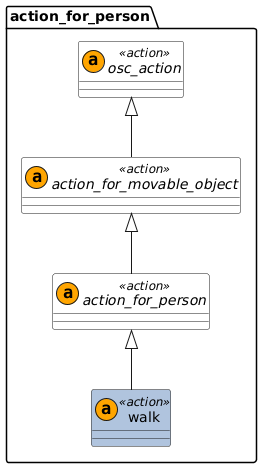
An actor of type person or animal can move in the scenario by using the generic action walk(), combined with movement modifiers.
Additionally, a person or animal can execute any of the actions of the classes they inherit from, like the action_for_movable_object.
This also means, that a person or animal can be instructed to move on a route with the along() modifier.
8.8.4.1 Action walk
Generic action to initiate the motion of pedestrians. Usually invoked in combination with modifiers.
- Basic information
-
Table 145. Basic information of action walk Parents
action_for_person
Controlled states
None directly. Depends on the modifiers.
Action ending
The action ends when the phase in which the action is invoked is terminated.
8.8.4.1.1 Examples
person.walk([, <inherited action parameters>])# Walk with constant speed while changing yaw angle from 0deg to 90deg
my_pedestrian.walk() with:
speed(1.0mps)
yaw(0deg, at: start)
yaw(90deg, at: end)
# Walk for 5 seconds along route "my_ped_route" starting at 3 m/s and stopping at the end
my_pedestrian.walk(duration: 5.0s) with:
along(my_ped_route)
speed(3.0mps, at: start)
speed(0.0mps, at: end)